See what an application receives in the API explorer
Run any delivery request as an anonymous visitor or as a granted application, see which of the eight checks pass, copy the request as curl or fetch, and preview drafts before anyone receives them.
- Applies to
- Headless CMS 1.0 and later
- Who can do this
- Developer, Administrator, Team member
- Permission
feature.hcms. api_explorer.view - Where
- Headless CMS › Delivery › API explorer
On this page
Before you start
- You need API explorer (
feature.) and View on content spaces (hcms. api_explorer.view feature.). Content Editors, Content Publishers and CMS Administrators have both.hcms. space.view - To read as an application you also need View on API access (
feature.). To preview drafts you need Preview drafts (hcms. access.view feature.) and View on content entries.hcms. entry. preview - The explorer is read-only. Its runs don't lock keys, pin versions or count as usage, so running a request as an application never changes what that application receives.
Steps
1. Choose what to read
- Open Headless CMS › Delivery › API explorer.
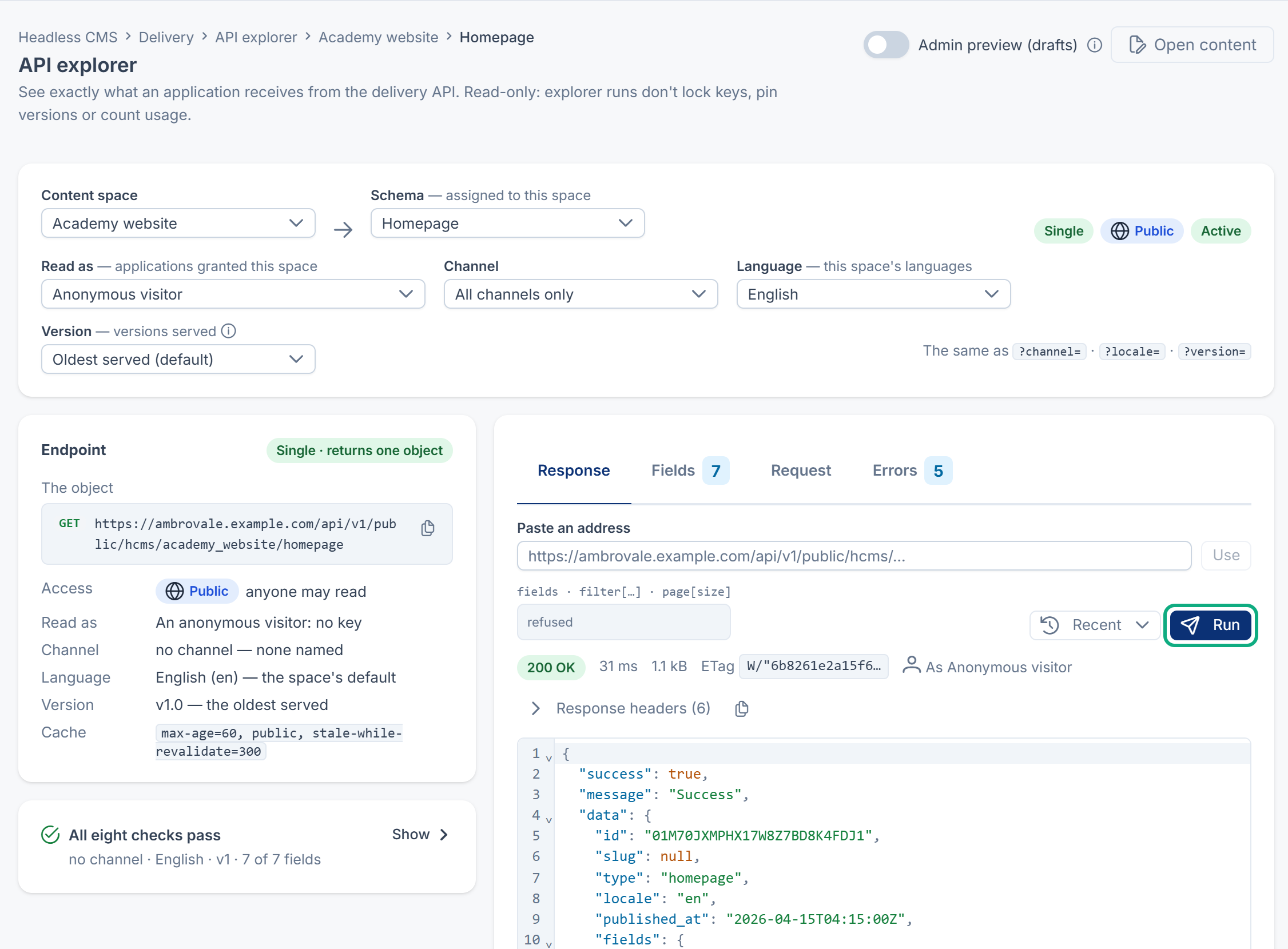
- Choose the Content space and the Schema. Only schemas assigned to the space are offered. The endpoint card says whether it returns a list (a Collection) or returns one object (a Single).
- For one item of a Collection, choose the item, or type its address or public id.
- In Read as, choose Anonymous visitor (no API key) or one of the Applications granted this space.
- Optional: choose the Channel, the Language and the Version. Left alone, they follow the same rules as a real request: the application's default channel, the space's default language, and the application's pin or the oldest version served.
You can also paste a delivery address into Paste an address and select Use.
2. Run it
Select Run, or press Ctrl+Enter (Cmd+Enter on a Mac).
3. Read the result
- Delivery checks: All eight pass, or Not delivered with the first check that fails, such as Delivery is on for this space. Select Fix it to open the screen where it's changed. Checks after a failing one show Not run.
- Response: the status, the JSON body and the response headers. A band explains anything unusual, for example Served in English. Hindi isn't published yet; fallback is on for this space., This channel empties the list., or A newer version (v2) is served. Select Copy JSON or Copy one item.
- Fields: each field the version sends, with its key, type, API format and language, and fields that are Hidden, Retired or Stopped. Select Open in Field Builder to change one.
- Request: the same request as curl, JavaScript fetch or JavaScript fetch (for a server), ready to copy, with a version that revalidates with
If-None-Match. - Errors: the bodies of the 401, 404 and 422 answers this address can give.
Tip: The samples never contain a key. A sample for an application reads its key from the server's own settings, because a key must never be put in a web page.
Preview drafts before they're published
- Turn on Admin preview (drafts).
- Select Run.
The response then includes drafts and unpublished changes, marked as such, with a band: Includes drafts and unpublished changes. Not what the public receives. Each changed value shows what's published now. The answer says how many unpublished and trashed entries it left out, and marks an item that would fail a check, such as one on a channel that isn't asked for.
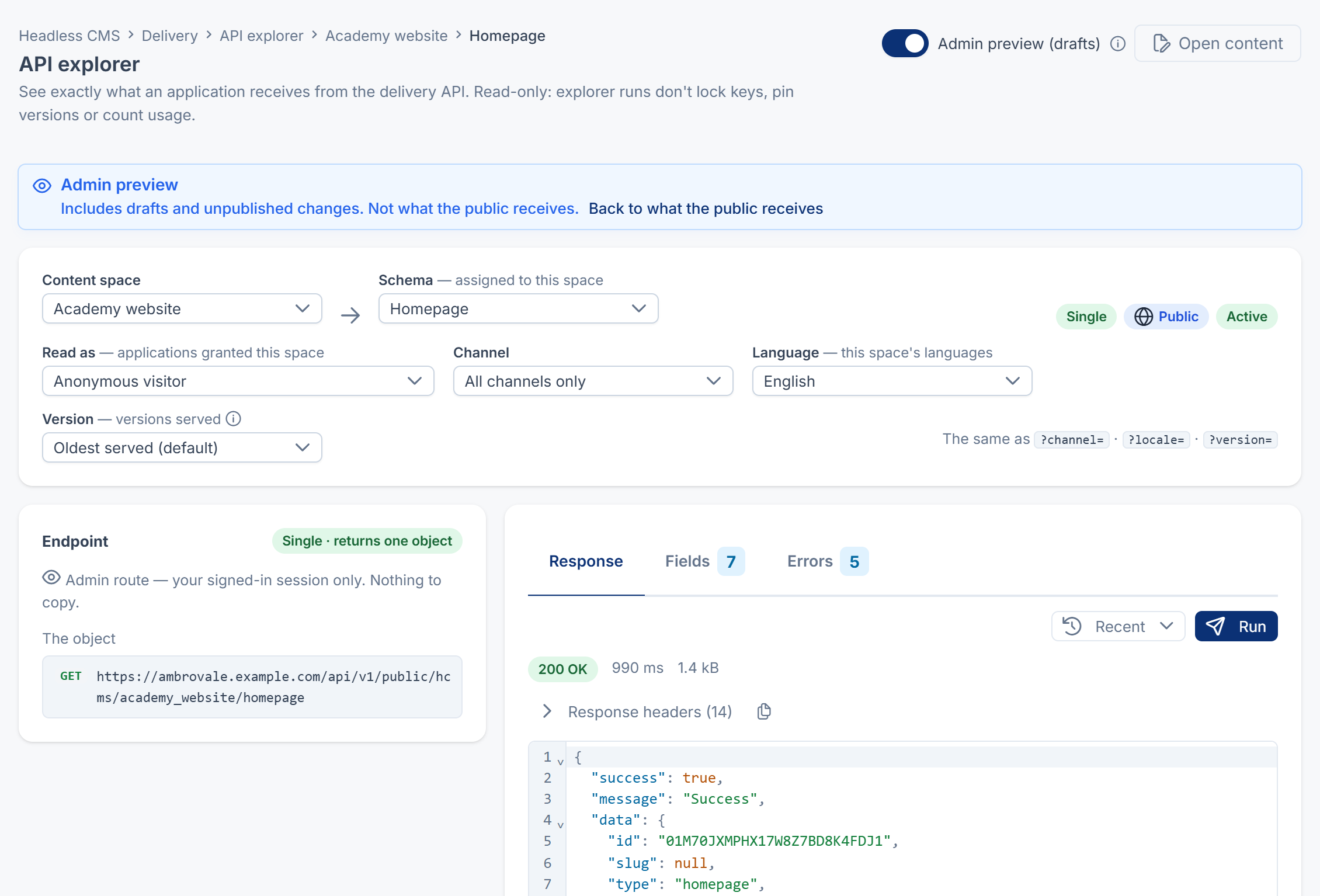
The preview runs only in your signed-in session, so there's no address to copy. Select Back to what the public receives to leave it. No delivery address, parameter or header can ever return a draft.
From an entry, More actions › Preview in API explorer opens the explorer on that entry with the preview on and runs it.
Open the explorer from other screens
Open in API explorer appears on a schema, an assignment's panel, a space, a grant (Open in API explorer as application) and an entry, and fills in the choices for you. Recent lists your last runs in this browser.
What happens next
When the checks pass and the response looks right, give the address and the request sample to your developers. For every parameter and status code, see Delivery API: addresses, parameters and responses. When a check fails, see An application doesn't receive your content.
Thanks. That helps us decide what to write next.
Thanks for telling us what was missing.
You already answered for this article today. Thanks.
We got a lot of answers from your network just now. Try again in a few minutes.
We couldn't send that. Check your connection and try again.
Links in this article
Printed from help.laramin.in. The online article may have changed since.