You can't give someone a role or permission
Why Access Assignments or the role editor won't let you give a role or permission, and what to do about each case.
- Applies to
- Roles & Permissions 1.3 and later
- Who can do this
- Platform owner, Administrator
- Permission
feature.rbac. assignment.edit
On this page
Symptom
You try to give a role or a permission, and the screen won't let you. Find what you see:
| What you see | Go to |
|---|---|
| The workspace or team isn't in the Scope list | 1 |
| That user is not an active member of … | 1 |
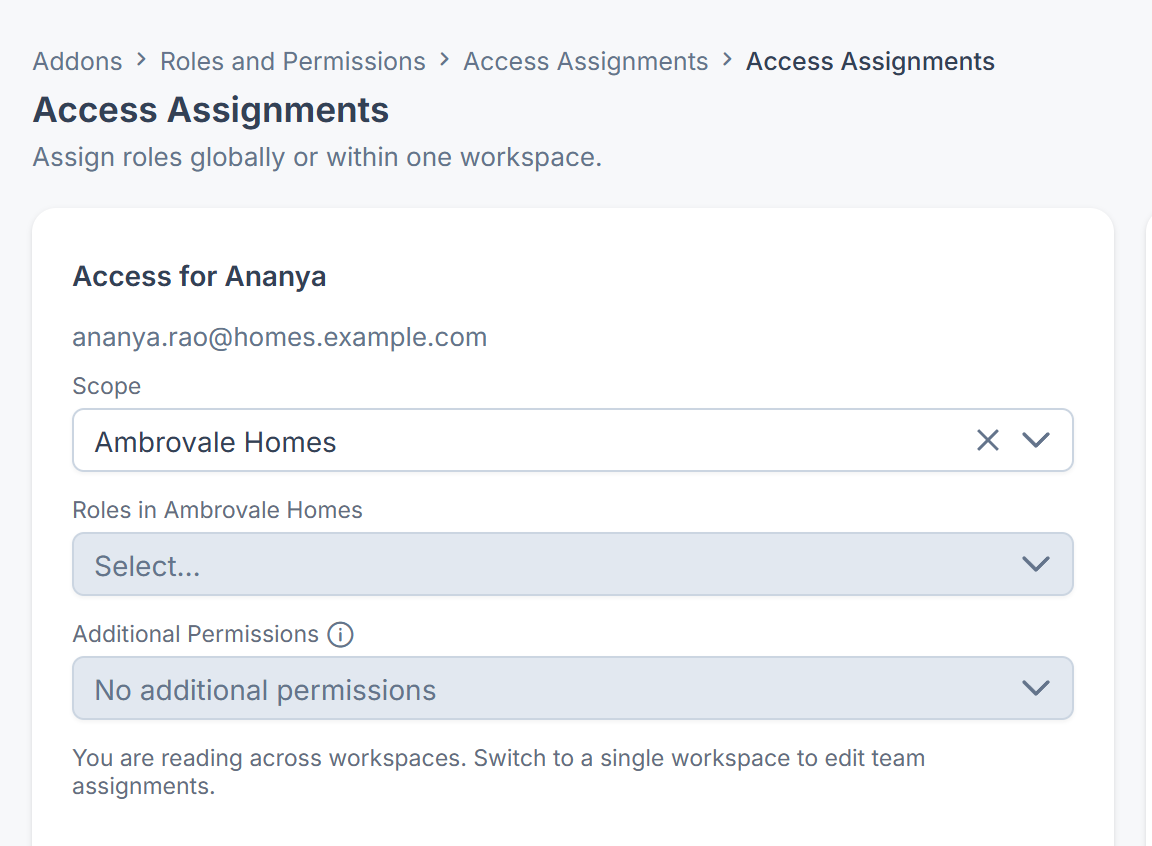
| You are reading across workspaces. Switch to a single workspace to edit team assignments. | 2 |
| No workspace is in force, so only global assignments can be edited. | 2 |
| You can view this scope but not change it. | 3 |
| A permission in Additional Permissions can't be chosen, or You cannot grant … here | 4 |
| A role in Roles in … can't be chosen or removed, or You cannot give … here | 5 |
| Cells in the role editor are locked, or Nothing was saved: you no longer hold … | 6 |
| The person doesn't come up in Search users… | 7 |
| You gave the role, but the person still can't do the thing | 8 |
Check these, in order
1. The person isn't a member there
You can only give someone a role or permission in a workspace or team they're an active member of. The Scope list shows only those places. Fix: add them to the workspace under Workspace Members, or to the team, then try again. See Create a workspace and Create a team.
Taking a role away always works, even if the person has since left the workspace or team.
2. No single workspace is chosen
Workspace and team assignments are changed one workspace at a time. Fix: in the header's Workspace switcher, choose the workspace, then open Access Assignments again. Global can be changed from anywhere.
3. You may look but not change
You hold List Assignment in this scope, but not Edit Assignment. Fix: ask someone who manages roles to give you Edit Assignment in that scope, or globally.
4. You don't hold the permission yourself
You can only grant a permission directly if you hold it yourself in that scope. Fix: ask someone who holds it, or a super admin, to grant it. If you don't see Additional Permissions at all, you don't have Grant Permissions Directly. See Grant a permission directly.
5. You don't hold every permission the role carries
Giving someone a role grants them every permission it carries, so you can only give a role if you hold all of them yourself in that scope. Roles you can't give are listed but can't be chosen, and the form says Roles that carry permissions you do not hold in this scope are shown but cannot be given. If you try anyway, you see You cannot give the role here — it carries a permission which you do not hold in that scope.
If the person already holds a role like that in this scope, you can't remove it either: it stays when you save.
Fix: ask a super admin, or someone who holds every permission in the role in that scope, to give or remove it. Or give a smaller role that carries only what the person needs.
6. You don't hold the permission globally
In the role editor, you can only grant or revoke permissions you hold globally, because a role applies everywhere. Those cells are locked: locked: you do not hold this permission. If you hold only the own-records part, the cell is partly locked. Fix: ask a super admin, or someone who holds the permission globally, to make the change. See Change or delete a role.
If Nothing was saved appears when you save, your own access changed after you opened the editor. Nothing was written.
7. The person can't be found
- They're a super admin. Only other super admins can find super admin accounts here. Their roles don't limit them anyway.
- Your authority is only in one team. Your search then covers that team's members only.
- They don't have an account yet. See Create a user.
8. The role is there, but it doesn't work
- They're working somewhere else. A workspace or team role only applies while they're working there. On All Workspaces, only global roles apply. Ask them to switch in the header.
- The role doesn't contain the permission. Open the person in Access Assignments and check Effective permissions. See See why someone can do something.
- They need an experience, not a permission. If they see Nothing to open here, give them an experience. See Choose which experiences a user can enter.
Still not working?
Raise a ticket from Support Center in your Laramin app. Include this page's link, the person, the scope and the exact message. See Raise a ticket.
Thanks. That helps us decide what to write next.
Thanks for telling us what was missing.
You already answered for this article today. Thanks.
We got a lot of answers from your network just now. Try again in a few minutes.
We couldn't send that. Check your connection and try again.
Links in this article
Printed from help.laramin.in. The online article may have changed since.