Property attributes by type
The details a property form asks for depend on its category, type and purpose. Every category and type, the attribute groups each type gets, the pricing fields for each purpose, and which lists you can add options to.
Why this step
The form changes with the property. The Purpose: What's on offer: Sale, Rent, Lease or Joint Venture. decides the money fields, so a rental asks for a deposit and a sale for a token amount.
Today you only need:
- Applies to
- Property CRM 5.0 and later
- Who can do this
- Administrator, Team member
- Where
- Property CRM › Properties
The property form changes as you fill it in. The Category decides which Property Type options appear, the type decides which groups the Property Details step shows, and the Purpose decides the pricing fields. Property CRM sets these attributes itself: you can't add your own fields to properties.
Categories and types
| Category | Property types | Attribute set |
|---|---|---|
| Residential | Apartment, Gated Community Apartment, High-Rise Apartment, Studio Apartment, Penthouse | Apartment |
| Villa, Independent House, Duplex House, Row House, Farm House | House | |
| Land / Plot | Residential Plot, Commercial Plot, Agricultural Land, Farm Land, Industrial Land | Land |
| Commercial | Office, Shop, Showroom, Warehouse, Industrial Building, Commercial Building, Co-working Space | Commercial |
Laramin refuses a category or type outside this table, even if someone adds one as an option in Static Fields: Select a valid property category. or The selected property type does not belong to the chosen category.
Property Details groups
The Property Details step shows only the groups that apply to the type. A dash means the set doesn't collect the field.
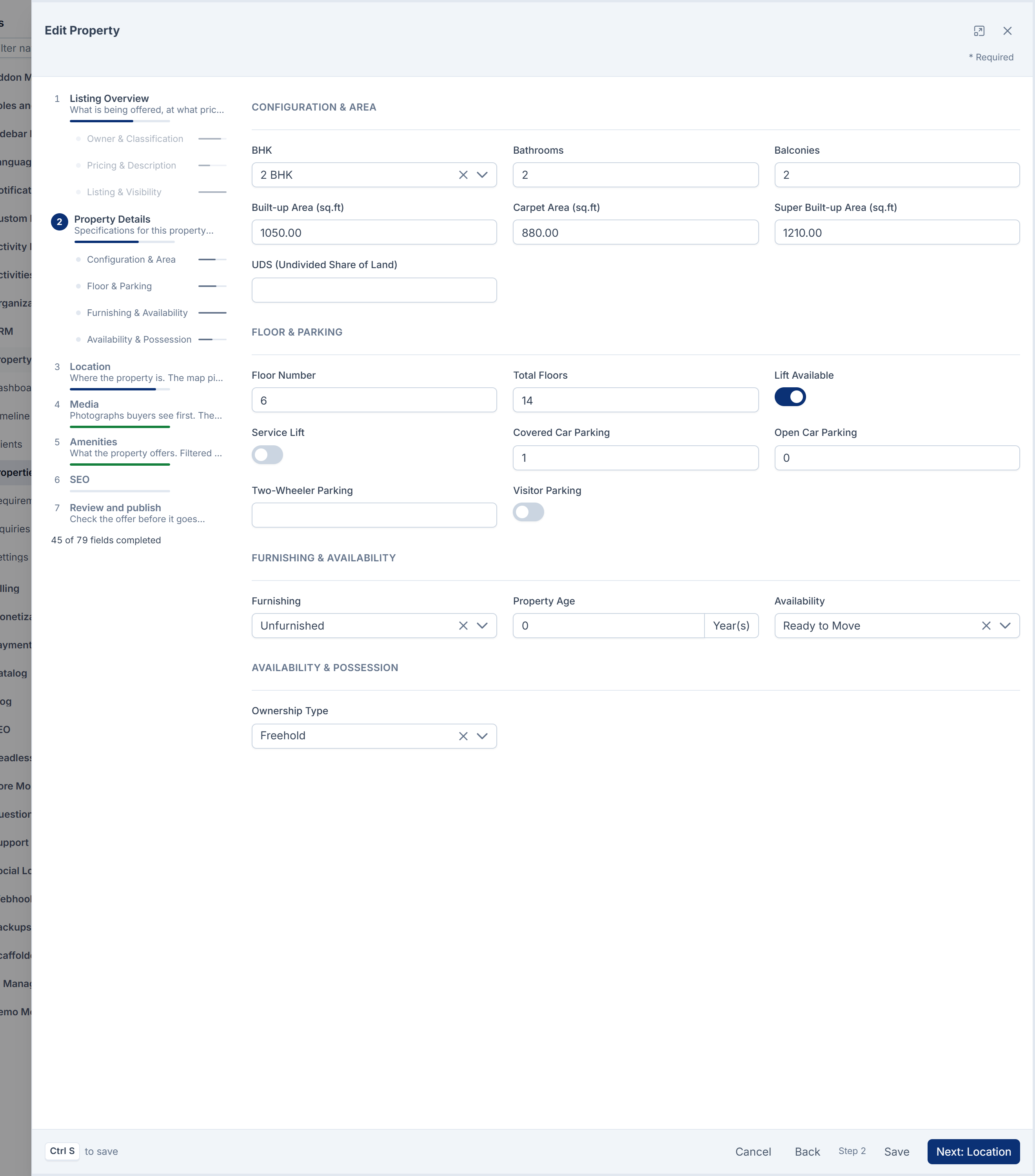
Configuration & Area
| Field | Apartment | House | Land | Commercial |
|---|---|---|---|---|
| BHK | Yes | Yes | – | – |
| Bathrooms, Balconies | Yes | Yes | – | – |
| Built-up Area (sq.ft) | Yes | Yes | – | Yes |
| Carpet Area (sq.ft) | Yes | – | – | Yes |
| Super Built-up Area (sq.ft) | Yes | – | – | – |
| UDS (Undivided Share of Land) | Yes | – | – | – |
| Land / Plot Area | – | Yes | Yes | Yes |
| Area Unit | – | Yes | Yes | – |
| Plot Dimensions | – | Yes | Yes | – |
Area Unit starts at Sq. Ft. The other units are Sq. Metre, Sq. Yard, Cent, Ground and Acre.
Floor & Parking
| Field | Apartment | House | Land | Commercial |
|---|---|---|---|---|
| Floor Number, Total Floors | Yes | Yes | – | Yes |
| Lift Available | Yes | – | – | Yes |
| Service Lift | Yes | – | – | – |
| Covered Car Parking, Open Car Parking | Yes | Yes | – | – |
| Two-Wheeler Parking, Visitor Parking | Yes | – | – | – |
Floor Number can be negative, down to -20, for basement floors.
Furnishing & Availability
| Field | Apartment | House | Land | Commercial |
|---|---|---|---|---|
| Furnishing: Unfurnished, Semi Furnished, Fully Furnished | Yes | Yes | – | – |
| Property Age, in years from 0 to 100 | Yes | Yes | – | Yes |
| Availability: Ready to Move, Ready to Occupy, Under Construction, Pre-launch, Resale | Yes | Yes | – | Yes |
Availability & Possession
| Field | Apartment, House, Commercial | Land | Shown when |
|---|---|---|---|
| Possession / Handover Date | Yes | – | Availability is Under Construction or Pre-launch |
| Available From | Yes | – | Purpose is Rent |
| Currently Tenanted | Yes | – | Purpose is Rent or Lease |
| Ownership Type: Freehold, Leasehold, Power of Attorney, Co-operative Society | Yes | Yes | Always |
Boundaries & Frontage (land only)
North Boundary Length (ft) and North Adjacent To, the same for south, east and west, Frontage Width (ft), Road Width (ft) and Road Facing.
Legal & Utilities (land only)
| Field | Notes |
|---|---|
| Patta Available, DTCP Approved, CMDA Approved, RERA Registered | Each can stay not specified, or be Yes or No, because the answer is often unknown when you list. |
| Survey Number, Subdivision Number | Text. |
| Water Connection, Electricity Connection, Drainage Connection, Compound Wall | Yes or no. |
Commercial Amenities (commercial only)
Customer Parking, Staff Parking, Washrooms, Power Backup, Central Air Conditioning, Fire Safety System, Loading Dock, Goods Lift and Reception Area.
Pricing fields by purpose
These appear under Pricing & Description on the Listing Overview step, beside Price, Price / Unit and Negotiable.

| Field | Sale | Rent | Lease | Joint Venture |
|---|---|---|---|---|
| Price on Request | Yes | Yes | Yes | Yes |
| Brokerage | Yes | Yes | Yes | Yes |
| All-inclusive Price | Yes | Yes | Yes | – |
| Booking / Token Amount | Yes | – | – | – |
| Security Deposit, Deposit (months of rent) | – | Yes | Yes | – |
| Maintenance Charge, Maintenance Period | – | Yes | Yes | – |
| Lock-in Period (months), Rent Escalation (%), CAM Charge, Notice Period (months) | – | – | Yes | – |
Maintenance Period is Monthly, One-time or Included.
Every property
Whatever the type: Facing, the location fields, the photos, Amenities, and under Listing & Visibility Show on website, Featured Listing, Verified Listing, Preferred Contact (Call, WhatsApp or Email) and Listing Expires On.
When you change the type or purpose
Laramin keeps only the attributes that apply to the new type and purpose. Values that no longer apply, such as BHK when a flat becomes a plot, are cleared when you save. Amenities are the exception: they stay ticked.
Checks when you save
| Laramin says | When |
|---|---|
| Carpet area can't exceed the built-up area. | Carpet Area is bigger than Built-up Area. |
| Built-up area can't exceed the super built-up area. | Built-up Area is bigger than Super Built-up Area. |
| The floor number can't exceed the building's total floors. | Floor Number is higher than Total Floors. |
Each check runs only when both fields are filled.
Completeness
A property's Completeness is the share of its fields that are filled. It counts the title, address, city, state, pincode, featured image, description and price (unless Price on Request is on), and every attribute for its type and purpose except:

- the four legal approvals,
- everything under Listing & Visibility,
- the fields that only show in some cases, such as Possession / Handover Date,
- Price on Request, and the yes-or-no extras such as Service Lift or Power Backup.
Lists you can add options to
These dropdowns are static fields. You can add options, and rename or recolor the ones Property CRM ships. See Manage static fields and their options.
BHK, Facing, Furnishing, Availability, Area Unit, Maintenance Period, Ownership Type, Contact Preference, Property From and Amenities.
Matching compares a few of these attributes with each buyer's requirement: BHK, Built-up Area (sq.ft) and the location. See How matching works.
Links in this article
Printed from help.laramin.in. The online article may have changed since.