How schema changes and versions keep applications working
Once content is published, a schema's shape is locked. Safe changes apply at once, changes an application could notice wait for a new version, and each application keeps the version it reads until you move it.
- Applies to
- Headless CMS 1.0 and later
- Who can do this
- Administrator, Developer
On this page
In short
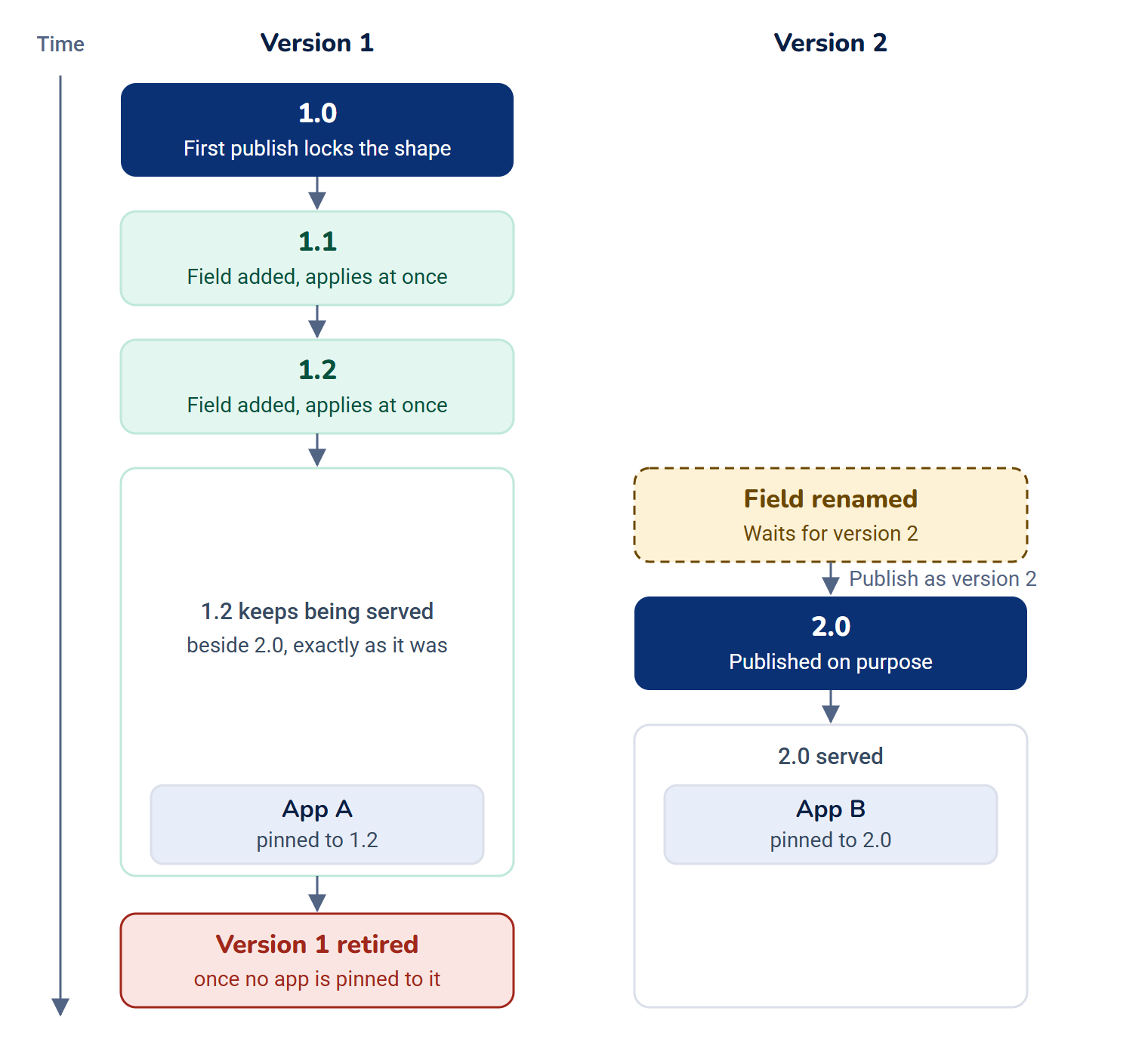
Applications depend on the shape of the JSON they receive. So the first time content from a schema is published, its shape is locked at version 1.0. From then on, adding something is safe and applies at once as a minor version (1.1, 1.2). A change an application could notice, such as renaming or removing a field, waits and is published on purpose as the next major version (2.0). The old version keeps being served, exactly as it was, until you retire it. Each application stays on the version it reads until you move it.
How it works
Before and after the shape is locked
Before anything from a schema is published, the schema page says Nothing from this schema has been published yet, so everything can still change, including the key and the type. Every change applies at once and records no version.
After the first publish, it says Shape locked. The schema's key and its type (Single or Collection) are fixed, and each field change follows the change rules. Select What needs a new version? on the Fields tab to see them for the schema.
The change rules
| Class | What happens | Changes in this class |
|---|---|---|
| History only | Applies at once and is logged. No version. | A label, help text or placeholder, a choice's label or order, the content-list filter |
| Minor | Applies at once and records the next minor of the latest version, for example 1.1. Older versions don't change. | Adding a field, a default value, making a field optional, a looser rule, a new choice, making a field translatable, retiring a field from the form or putting it back |
| Guarded minor | Asks first, showing what it affects, then records a minor. | Making a field required (it then needs a default), a stricter rule, removing a choice, making a field shared, widening the type, such as Text to Textarea |
| Waits for version N | Held until someone publishes the next version. The button reads Save for version N. The versions served now keep serving. | Renaming a field's key, changing its API format, hiding it from the API, deactivating it, removing it |
| Blocked | Not possible. Add a new field and retire this one instead, or copy the schema. | Changing a field's type, other than widening it, or a Reference's target schema |
A stricter rule applies to every version at once, because there's one stored value and one rule set. Published entries that break it stay delivered as they are, but can't be published again until an editor fixes them. The dialog lists them.
A field that no served version sends yet can change more freely; the rules panel says so for each class.
Field states
Appears in decides where a field shows:
| State | Editors' form | The API |
|---|---|---|
| Delivered | Yes | Yes |
| Hidden | Yes | No |
| Retired | No | Yes, its last published value |
| Inactive | No | No |
Hidden fields never appear in a response, not as null and not as an empty string.
Publish the next version
When changes are waiting, the Fields tab shows Waiting for version N with the number of changes, and you can Discard them.
-
Open the schema's Versions tab.
-
Select Publish as version N.
-
Read the dialog and select Publish.
All waiting changes publish together as one new version. Every version reads the same stored content, so nothing is copied or migrated. No application is moved to the new version, and callers without a key keep getting the oldest version still served.
Which version a request gets
- A request that names
?version=2gets version 2, while it's served. - Otherwise, an application with a key gets the version it's pinned to. Its first request to a schema pins it: to the oldest served version on a Public space, and the latest on a Restricted one.
- Otherwise, the request gets the oldest version still served. Requests without a key are never pinned.
When a newer version is served, the response says so in meta.. The Versions tab shows who calls each version and when they last called.
Move applications to a newer version
- Ship the application's change first, so it can read the new shape.
- On the Versions tab, select Move applications to vN. API access opens on that schema.
- For each application, select Move schema to vN. The dialog lists what changes between the versions, such as a field that is now sent under another name.
- Select Confirm. Undo is offered.
See Give an application access to a content space.
Retire an old version
When no application needs an old version, select Retire version N on the Versions tab and type the confirmation. Afterwards a request for ?version=N gets an error, and callers without a key get the next oldest version. It can't be undone, and the version's definition stays in the change log.
- You need Retire a version (
feature.). Core's Administrator role never includes it.hcms. schema. retire_version - The only version served can't be retired. To stop delivering a schema, turn its API off or deactivate it instead.
- A version can't be retired while applications are pinned to it. Move them first.
- A version nobody has called for 90 days is marked No calls in 90 days. Nothing is retired automatically. Change the number of days in Headless CMS settings.
Stop sending a field at once
If a field's value must not be sent another minute, for example personal data published by mistake, use the emergency stop:
-
On the Versions tab, select Stop sending a field now….
-
Choose the field, and optionally give a reason.
-
Type the confirmation and select Stop sending.
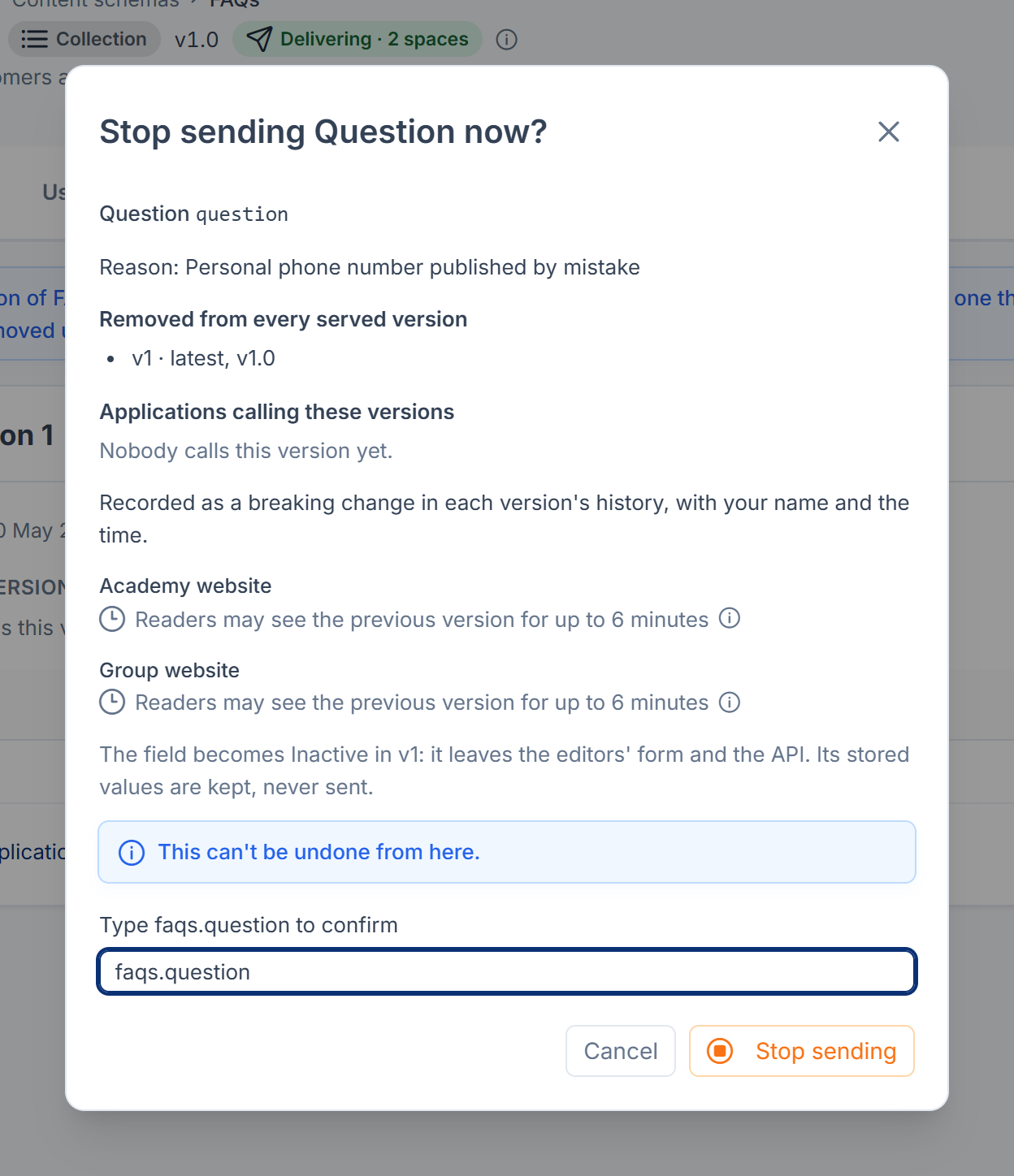
The field disappears at once from every served version and becomes Inactive. Its stored values are kept, never sent. It's recorded as a breaking change in each version's history, with your name and the time, and the version numbers don't change. You need Emergency stop a field (feature.), which Core's Administrator role never includes.
The change log
Select Open the change log on the Versions tab. It lists every version of every major, retirements and emergency stops, then other changes to the schema and its fields, newest first. Select View definition on a version to see exactly what it sends. Other changes need the Activity Log add-on; without it, only versions are recorded.
How it relates to
- API access: pins belong to an application's grant on a space. See Give an application access to a content space.
- The API:
?version=,meta.andschema_version meta.are described in Delivery API: addresses, parameters and responses.newer_version - Copying: to change a schema's type, copy it as a new schema, move your applications to the new key, then remove the old one. See Create a content schema and add its fields.
Next steps
Thanks. That helps us decide what to write next.
Thanks for telling us what was missing.
You already answered for this article today. Thanks.
We got a lot of answers from your network just now. Try again in a few minutes.
We couldn't send that. Check your connection and try again.
Links in this article
Printed from help.laramin.in. The online article may have changed since.