Add a manual payment method
Add a way to pay that you check yourself, such as a bank transfer: its currency and charges, the instructions the payer sees, and the details the payer fills in. Also change or delete one, and update the preloaded Bank Transfer.
- Applies to
- Payment Gateway 4.0 and later
- Who can do this
- Platform owner, Administrator
- Permission
feature.pg. gateway. create - Where
- Payment Gateway › Payment Gateways
On this page
A manual payment method is one where the payer pays outside your Laramin, for example by bank transfer, and you check the money has arrived. You write the instructions the payer follows and choose the details they give you, such as a transaction number.
Careful: In Payment Gateway 4.0.1 with Billing 2.0.0, no payment screen offers manual methods to payers. You can set them up, but payers don't see them.
Before you start
- You need Create Gateway (
feature.). To change a method later you need Edit Gateway (pg. gateway. create feature.), and to delete one, Delete Gateway (pg. gateway.edit feature.).pg. gateway. delete - Work in a single workspace, not in All Workspaces. The method belongs to the workspace you're in. See Switch workspace.
- Have a logo or picture for the method ready. It's required.
Steps
-
In the sidebar, open Payment Gateway › Payment Gateways.
-
Select New Payment Gateway.
-
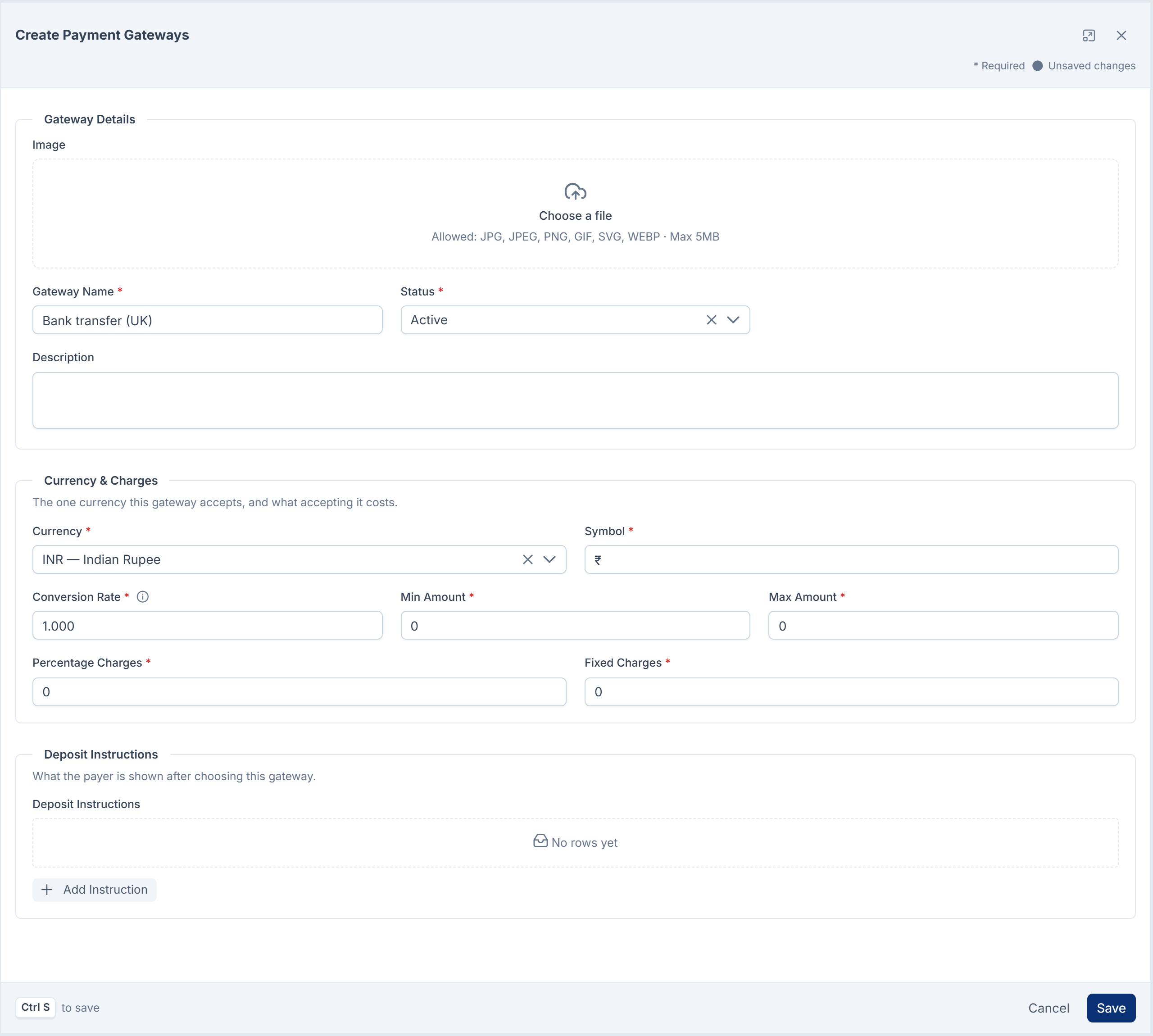
Under Gateway Details:
- Add an Image.
- In Gateway Name, enter the name payers will see, for example
Bank transfer (UK). Up to 40 characters. - Leave Status on Active.
- Optionally, add a Description.
-
Under Currency & Charges, choose the one Currency this method accepts. Symbol and Conversion Rate start with your default currency's values, so change them if you chose another currency. Then set Min Amount, Max Amount, Percentage Charges and Fixed Charges, or leave them at
0. -
Under Deposit Instructions, select Add Instruction for each thing the payer needs to know:
- In Type, choose Text, Image (a picture's address, such as a QR code) or Link.
- In Title, enter a label, for example
Account name. - In Value, enter what the payer should see. Use your own business's details.
-
Select Save.
You see Gateway … Created Successfully!, and the method is listed with Gateway Type Manual.
[Confirm: in Payment Gateway 4.0.1 with Billing 2.0.0, Min Amount, Max Amount, Percentage Charges, Fixed Charges and Conversion Rate are saved but not applied to any payment.]
When Laramin refuses
| Message | What to do |
|---|---|
| The payment gateway name already exists. | Another gateway in this workspace has the same name, ignoring spaces and capitals. Choose a different name. |
| Switch to a single business before adding or changing payment gateways. | Choose a workspace in the header's Workspace switcher. |
Choose what the payer fills in
The details a payer gives you, such as a transaction number, are custom fields. Define them first in Custom Fields, for payment gateways. See Add a custom field.
-
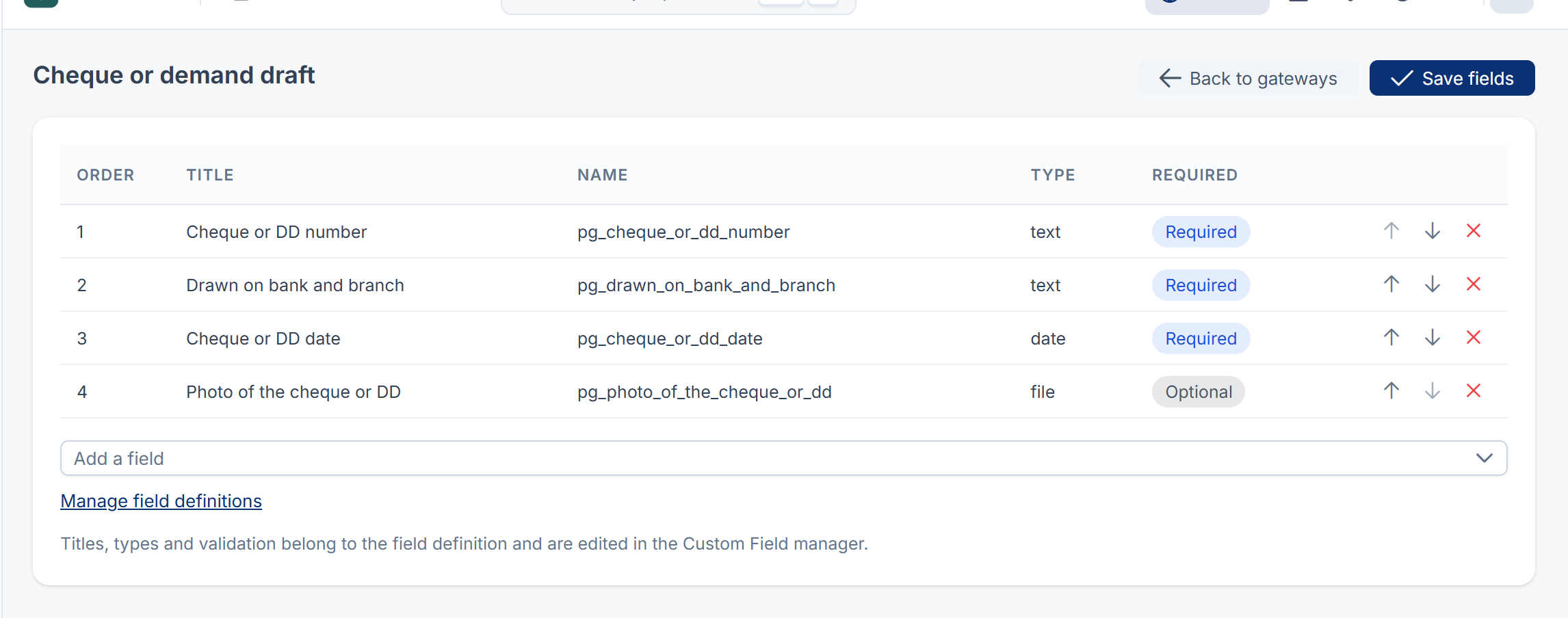
On the Payment Gateways list, open the method's actions menu and select Update Gateway Fields.
-
In Add a field, choose a field. Repeat for each field you want.
-
Use Move up and Move down to set the order the payer sees them in. Use Remove to take a field off.
-
Select Save fields.
You see Payer fields saved. A field's title, type and whether it's required belong to the field itself. To change them, select Manage field definitions, which opens Custom Fields.
If you see Custom Field module not installed, install and turn on Custom Fields first. Your saved choice of fields is kept until it's back.
The preloaded Bank Transfer
Payment Gateway sets up Bank Transfer when it's installed. Its Gateway Type is Preloaded. It comes with sample deposit instructions and asks for a transaction number and an email address.
Before you use it, open it with Edit and replace every sample instruction with your own account details, or remove them. You can change everything about it except its type, and you can't delete it.
Change or delete a method
- Change: open the row's actions menu and select Edit. Change the fields, then select Save. You see Gateway … Updated Successfully!.
- Switch off: edit it and set Status to Inactive.
- Delete: open the row's actions menu and select Delete, then type the method's name to confirm. You see Manual Gateway … Deleted Successfully!. Its currency and charges are deleted with it. This can't be undone: there's no trash for gateways. Only Manual methods can be deleted.
Thanks. That helps us decide what to write next.
Thanks for telling us what was missing.
You already answered for this article today. Thanks.
We got a lot of answers from your network just now. Try again in a few minutes.
We couldn't send that. Check your connection and try again.
Links in this article
Printed from help.laramin.in. The online article may have changed since.