A custom field doesn't show on a form
You added a custom field, but it isn't on the form, it's in the wrong place, or its value isn't saved. Find the cause and fix it.
- Applies to
- Custom Fields 2.0 and later
- Who can do this
- Platform owner, Administrator
- Permission
feature.cf. entity.view - Where
- Custom Field › Custom Fields
On this page
Symptom
One of these:
- A custom field you added isn't on the form you expected.
- It's there, but not where you expected.
- People fill it in, but the value is gone when they open the record again.
Open Custom Field › Custom Fields, select Manage fields on the entity, and check the Live preview. It shows the fields exactly as the form gets them.
Check these, in order
1. The page was open before you added the field
A form you opened before adding the field may not have it yet. Reload the page in your browser, then open the form again.
2. The field is disabled or in the trash
In the entity's field list, check the field's Status. A Disabled field doesn't show on forms. The note under the preview says how many fields are hidden.
If the field isn't in the list, open the list's Trashed view.
Fix: Edit the field and set Status to Enabled, or restore it. See Change, turn off or delete a custom field.
3. It's on a different entity
Some entities share a name. Party from Organization and Party from Crm are different entities, with their own fields. So are Category from Blog and from ProductCatalog. Check the Module column.
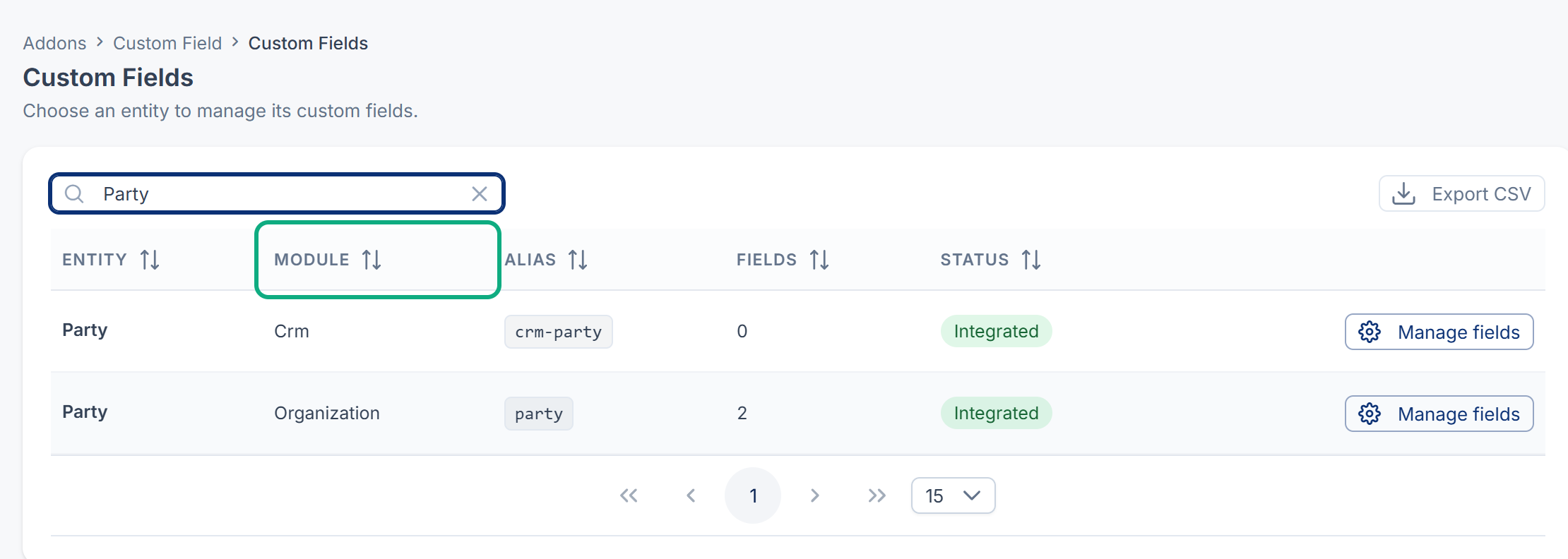
Fix: Add the field to the right entity.
4. It's a group, or it's inside one
A Form Group Label field is a heading, not something to fill in. The fields inside it appear together in their own section after the form's other fields, or as their own step on a form that works in steps. Look at the end of the form.
5. The entity's form doesn't show custom fields
Most entities in the list show their custom fields on their form. A few don't: Product Catalog's Variant, Payment Gateway's Payment Gateway and Question Bank's question parts, such as Mcq Option, have no form that shows custom fields. Property CRM properties aren't in the list at all.
6. An add-on is turned off
The fields show only while Custom Fields is turned on, and an add-on's entities only while that add-on is turned on. See Disable or delete an add-on.
7. The value isn't saved
-
If the entity's Status is Capable, the field manager says Fields can be defined, but this entity needs the HasCustomFields trait for values to auto-save. Values for this entity aren't saved until a developer connects it.
-
A value that breaks the field's rules is refused when the form is saved, with a message under the field. For example, a Required field is empty, an Email Input isn't an email address, or the text is longer than Max Length.
Still not working?
Raise a ticket from Support Center in your Laramin app. Include this page's link, the entity and its module, the field's name, and the form where you expected it.
Thanks. That helps us decide what to write next.
Thanks for telling us what was missing.
You already answered for this article today. Thanks.
We got a lot of answers from your network just now. Try again in a few minutes.
We couldn't send that. Check your connection and try again.
Links in this article
Printed from help.laramin.in. The online article may have changed since.