How Monetization packages and sells your plans
Plans, features, regions and prices that every business shares, and the subscriptions, renewals, promotions and credits each business keeps: where each comes from and how Monetization works with CRM, Billing and Product Catalog. Start here.
- Applies to
- Monetization 3.0 and later
- Who can do this
- Administrator, Team member
On this page
In short
Monetization describes what you sell by subscription. A plan says which features a customer gets, such as 10 seats or 5,000 API calls a month, and what it costs in each currency and billing interval. When a customer accepts a CRM quote for a plan, Monetization starts a subscription and renews it each period by raising an invoice in Billing.
Plans, features and prices are one catalogue that every business in your Laramin shares. Subscriptions, renewals, promotions and product credits belong to the business that sold them.
How it works
The parts
| Part | What it is | Where you see it |
|---|---|---|
| Region | A country, or one state of it, that you price for, with the currencies and languages used there. | Monetization › Regions |
| Feature | Something a plan can include, such as seats, storage or priority support, with the kind of value it takes. | Monetization › Features |
| Feature group | A heading that features appear under when customers compare plans. | Monetization › Feature groups |
| Plan | What you sell: a name, an optional region, its prices, the features it includes (Entitlements) and anything it bundles (Bundled offerings). | Monetization › Plans |
| Offering price | What something a plan can bundle costs on its own, per currency and interval. | Monetization › Offering pricing |
| Subscription | One customer on one plan, with its price, its current period and when it renews or ends. | Monetization › Subscriptions |
| Renewal attempt | One try at renewing a subscription for a period, and what happened to it. | Monetization › Renewals |
| Promotion | A discount code with its limits and dates. | Monetization › Promotions |
| Product credit | Extra units of a feature given to one customer, such as 500 API calls. Never money. | Monetization › Product credits |
Shared catalogue, separate sales
Each business in your Laramin is a workspace. Monetization splits its records into two kinds:
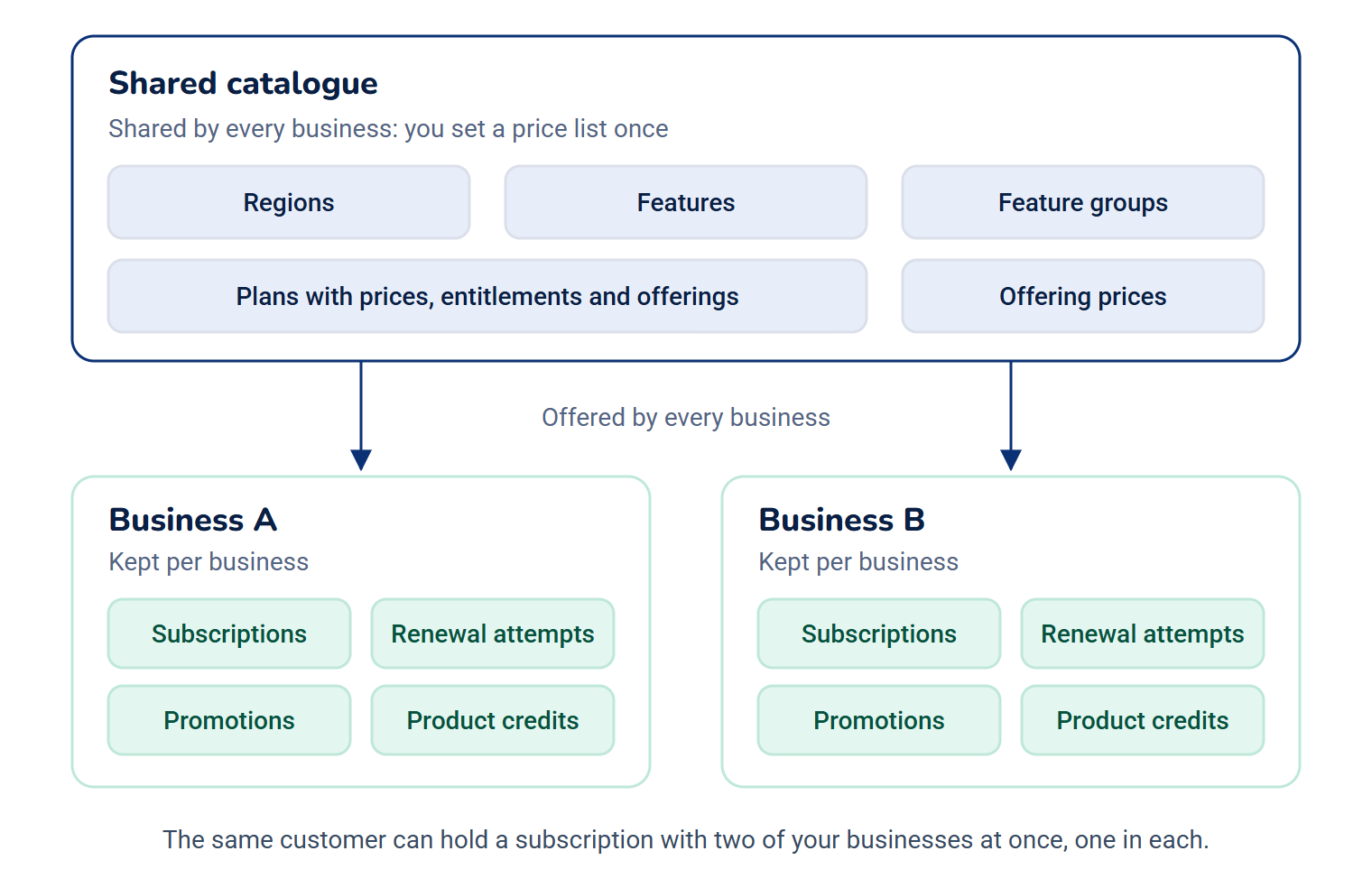
- Shared by every business: regions, features, feature groups, plans with their prices, entitlements and offerings, and offering prices. A plan created while you're in one business is offered by all of them, so you set a price list once.
- Kept per business: subscriptions, renewal attempts, promotions and product credits. Each one belongs to the business that sold it, for good. The same customer can hold a subscription with two of your businesses at once, one in each.
In a single workspace you see and act on that business's subscriptions, renewals, promotions and credits only. In All Workspaces you can read those of every business you can enter, with a Business column, but you can't change anything. Laramin says Switch to a single business before selling or changing anything here. See Switch workspace.
Where things go from here
| What you do in Monetization | What happens elsewhere |
|---|---|
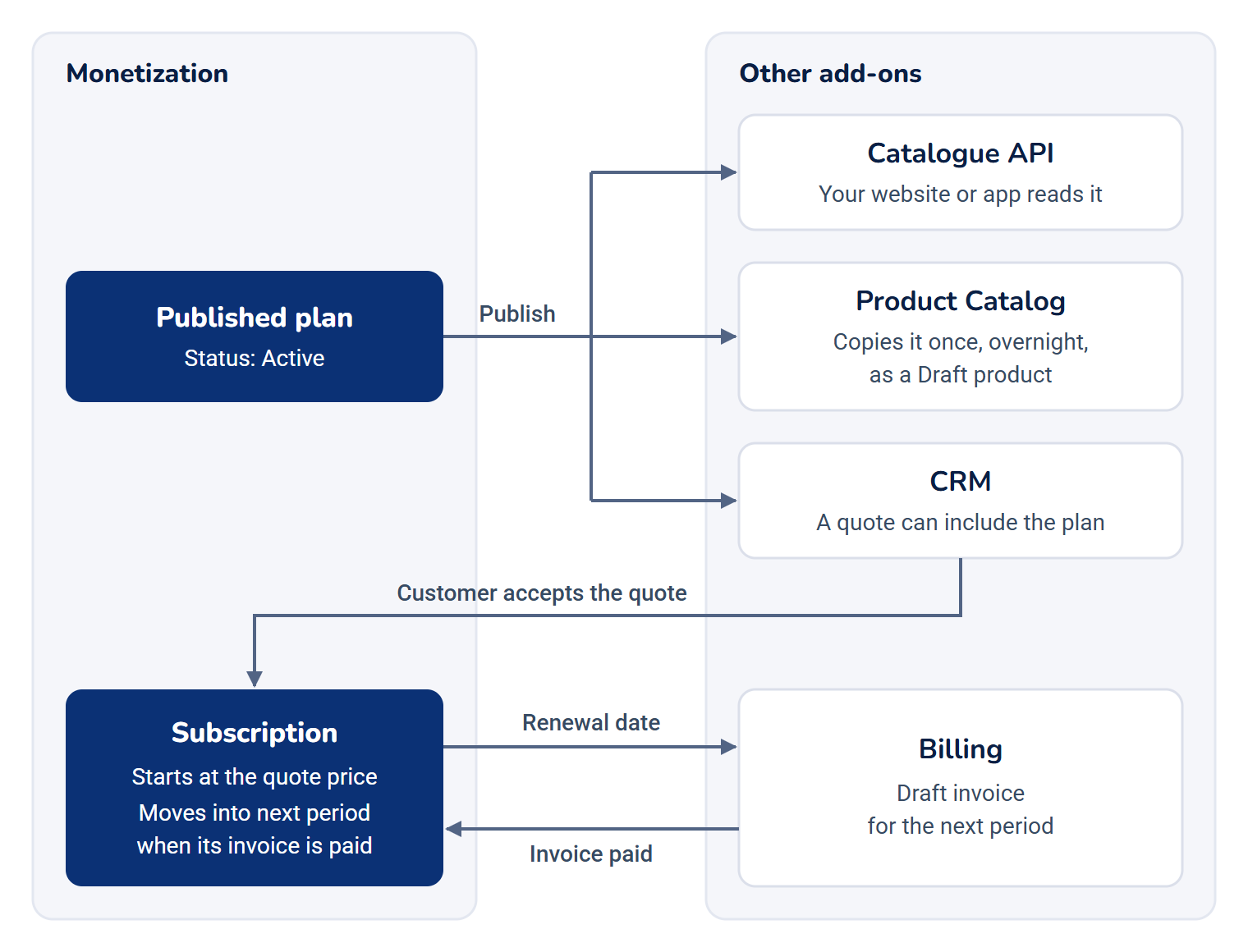
| Publish a plan (its Status becomes Active). | CRM can add it to a quote, and your website or app can read it from the catalogue API. See Monetization catalogue API reference. |
| Leave a plan active overnight. | Product Catalog copies it into the catalogue as a Draft product, once. See How the Product Catalog works. |
| A customer accepts a CRM quote with a plan on it. | Monetization starts a subscription at the price on the quote. Billing records an order for the quote. |
| A subscription reaches its renewal date. | Monetization asks Billing for a draft invoice for the next period. When the invoice is paid, the subscription moves into that period. |
| A renewal payment is refunded in full. | Monetization ends the subscription at once. |
In Monetization 3.0.0 a subscription can only be started by an accepted CRM quote, or by your own integration code. The Subscriptions screen has no New button and the catalogue API is read only.
What you can change on screen
- Add and change regions, features, feature groups, plans and their prices, entitlements and offerings, and offering prices.
- Publish and Archive a plan. Duplicate is offered too, but in Monetization 3.0.0 it fails with a server error and copies nothing.
- Cancel, Resume and End now a subscription. See Cancel, resume or end a subscription.
- Add promotions, and grant, edit and revoke product credits.
Renewal attempts are read only. Nobody can retry one by hand: retries follow a schedule. See How subscriptions and renewals work.
In Monetization 3.0.0 nothing in your Laramin redeems a promotion code or spends a product credit. You can set them up and revoke them, but no renewal is discounted and no feature limit is raised unless another add-on or your own integration uses them.
Who does what
Monetization brings no roles of its own. Give its permissions through a role, for example one for your sales operations team and one for finance. See Give someone a role.
| Someone who… | Needs |
|---|---|
| Builds the price list | feature., feature., feature., and the region and feature permissions |
| Decides what's on sale | feature. and feature. |
| Looks after customers' subscriptions | feature., view, and cancel, resume or end_now |
| Watches renewals | feature. and feature. |
| Runs promotions and goodwill credits | feature. and feature. |
Every permission is listed in Monetization permissions and server settings.
Where to find it
The Monetization menu holds Subscriptions, Renewals, Promotions, Product credits, Plans, Features, Feature groups, Regions and Offering pricing. Each item shows only to people whose permissions allow it.
The Monetization menu is in the Platform Administration experience's sidebar only. Someone who can't enter Platform Administration has no menu path to it, even with Monetization permissions. See Switch to another experience.
How it relates to
- Billing: every priced renewal is a draft invoice in Billing, on the customer's billing account. Billing works out the tax and numbers the invoice when it's issued. Without Billing, free subscriptions still renew, and priced ones wait. See How subscriptions and renewals work.
- Payment Gateway: takes the money for an invoice. Monetization never talks to a gateway itself.
- CRM: its quote builder offers your active plans. An accepted quote starts the subscription, and the customer's party gives the billing account.
- Product Catalog: copies your active plans in as draft products, so you can describe them there. A plan can also bundle a catalogue product as an offering, and a catalogue bundle can contain a plan. See Build a bundle.
- Currencies: a price can only be in a currency listed under Configurations › Master Settings › Currency. See Manage currencies and locations.
- Custom Fields: plans, features, feature groups and regions can carry fields of your own.
Next steps
Thanks. That helps us decide what to write next.
Thanks for telling us what was missing.
You already answered for this article today. Thanks.
We got a lot of answers from your network just now. Try again in a few minutes.
We couldn't send that. Check your connection and try again.
Links in this article
Printed from help.laramin.in. The online article may have changed since.