You aren't alerted to new inquiries
Nobody is told when an inquiry arrives, is assigned or is converted, or a listing-expiry, sold or rented alert goes to the wrong person or never comes. Find the cause and fix it.
- Applies to
- Property CRM 5.1 and later
- Who can do this
- Administrator
- Permission
feature.pcrm. setting.edit - Where
- Property CRM › Settings
On this page
Symptom
An inquiry arrives in Inquiries, but nobody on your team gets a bell, an email or a text about it. Or one of these alerts doesn't come, or goes to someone you didn't expect:
- an inquiry was assigned to someone;
- an inquiry was converted into a client;
- a listing is about to reach its Listing Expires On date;
- a property was sold or rented, or a requirement was fulfilled.
Laramin shows no error. The inquiry itself is saved as normal, whatever happens to the alert.
Check these, in order
1. Lead Alert Recipients is empty
New-inquiry alerts go only to the people in Lead Alert Recipients. It's empty by default, so until someone fills it in, nobody is told about a new inquiry from any channel.
Fix: open Property CRM › Settings. On General, add people to Lead Alert Recipients, then select Save changes. See Property CRM settings.
2. The recipient doesn't work in the inquiry's business
The Lead Alert Recipients picker lists every active user on your Laramin, whichever business they work in. When an inquiry arrives, Laramin tells only the people on the list who can work in that inquiry's business. Super admins are always told. Anyone else is skipped, and nothing on screen says so.
Fix: pick people who are members of the business, or add them to its workspace. See Create a workspace.
Whoever runs your server can confirm it: the server log has a line for each person skipped.
Couldn't copy. Select the code and press Ctrl+C (⌘+C on a Mac).
[pcrm] lead-alert recipient #<id> skipped: cannot operate in business <ref>Replace the highlighted values with your own.
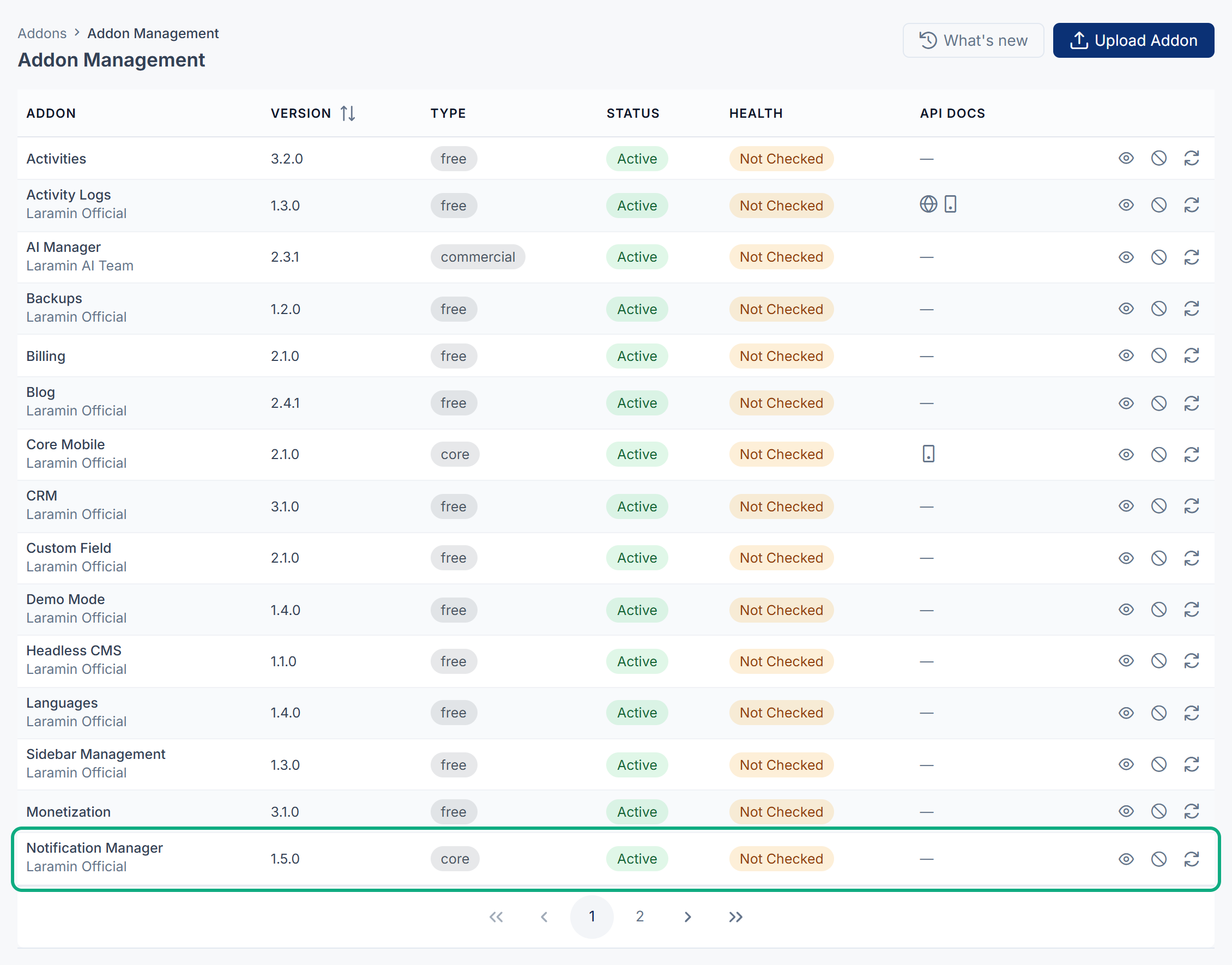
3. Notification Manager isn't installed or turned on
Property CRM sends every alert through the Notification Manager add-on. Without it, nobody receives them, and nothing on screen says so. This applies to the team alerts and to the automatic replies to leads.
Fix: in Addons › Addon Management, check that Notification Manager is installed and turned on. See How Notification Manager sends notifications.
4. Notification Manager didn't send it
Look for the alert in Notification Manager's Delivery Logs, and follow A notification wasn't sent or didn't arrive. The usual causes are an event or channel that's switched off, a provider that isn't connected, or background jobs that aren't running.
Alerts are sent in the background. If background jobs aren't running, nothing is sent and Delivery Logs stays empty. See Scheduled jobs don't run.
5. You expected an assignment or conversion alert
- Assigned: only the new assignee is told, and only when Assigned To changes to a different person. Unassigning an inquiry, or saving it without changing the assignee, tells nobody.
- Converted: the inquiry's assignee is told. Only when nobody is assigned does the alert go to Lead Alert Recipients.
- From your website: inquiries that come from a website arrive with nobody assigned, so only Lead Alert Recipients hear about them. See Inquiries from your website.
6. A listing-expiry, sold or rented alert went to someone else
These alerts go to the person who added the property, not to its Assigned agent. A requirement-fulfilled alert goes to the person who added the requirement. Only when Laramin has no record of who added it are Lead Alert Recipients told instead.
Fix: there's no setting that sends these to the assigned agent. Ask the person who added the property to pass the alert on.
7. No listing-expiry reminder came at all
-
The reminder is off. Listing Expiry Reminder (days before) is
0by default, which sends no reminders. Set it in Property CRM › Settings. -
The date didn't line up. The reminder is sent once, on the day that's exactly that many days before Listing Expires On, in your business's time zone. It's sent only for properties that are Available on that day. A date set closer than the reminder period, or a property Under Offer on that day, gets no reminder.
-
Scheduled jobs didn't run that day. A daily scheduled job sends the reminders. If it didn't run on the day, that listing's reminder is skipped, not sent later. See Scheduled jobs don't run.

The lead didn't get an automatic reply
The automatic reply to a new lead is sent only when all of these are true:
- Auto-acknowledge new leads is on in Property CRM › Settings. It's off by default.
- The lead gave a valid email address, for the email reply, or a mobile number, for a text or WhatsApp reply.
- Notification Manager has a template for that channel. An email template comes with Property CRM. Text and WhatsApp replies are sent only once someone builds a template for them.
Send client welcome message works the same way, when an inquiry is converted into a client.
Still not working?
Raise a ticket from Support Center in your Laramin app. Include this page's link, the inquiry's code, the time it arrived, who you expected to be told, and what you checked.
Thanks. That helps us decide what to write next.
Thanks for telling us what was missing.
You already answered for this article today. Thanks.
We got a lot of answers from your network just now. Try again in a few minutes.
We couldn't send that. Check your connection and try again.
Links in this article
Printed from help.laramin.in. The online article may have changed since.