Blog settings and permissions
Every field on the Blog URLs panel and on the article, category, tag and author forms, with their limits, and the permissions that control each screen and each publishing step.
- Applies to
- Blog 2.3 and later
- Who can do this
- Platform owner, Administrator
- Where
- Blog › Articles, Categories, Tags and Authors; Settings hub › Blog › Blog URLs
On this page
Blog URLs
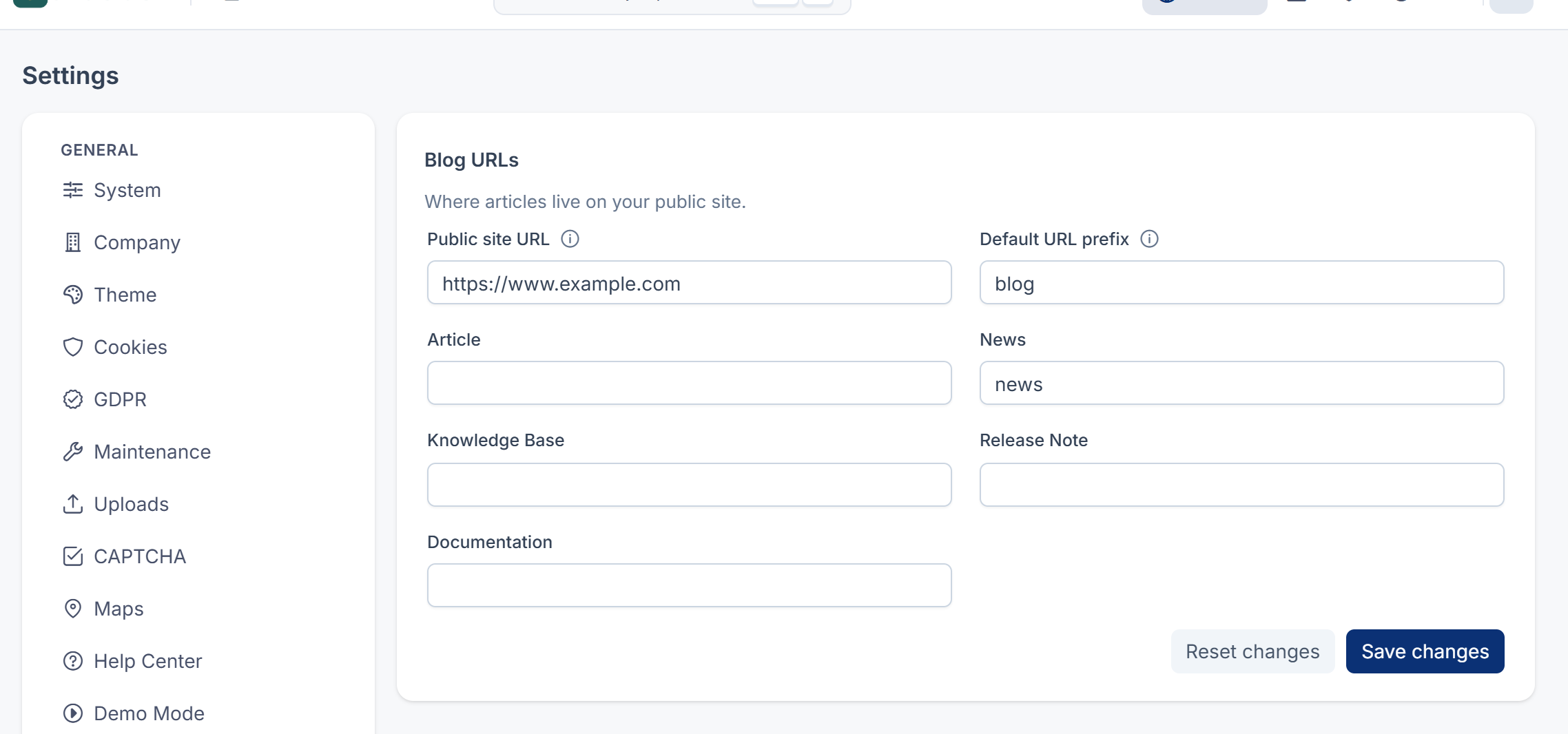
The Blog URLs panel, under Blog in the Settings hub. Select Save changes to save it. See How the settings hub works.
| Field | What it does | Rules |
|---|---|---|
| Public site URL | Your website's address. Used for the Preview button, the address shown under Slug, and article addresses in your sitemap and feed. Left empty, there's no Preview button, and the sitemap uses your Laramin's own address. | A full address. Up to 255 characters. |
| Default URL prefix | The part of the address before the slug, for content types without their own prefix. | blog when empty. Up to 64 characters: lowercase letters, numbers, - and /. |
| Article, News, Knowledge Base, Release Note, Documentation | A prefix for that content type only. | The same |
The article form
Blog › Articles, then New Article, or open an article. The form opens as a full page. Select Save changes to save it.
Content
| Field | What it does | Rules |
|---|---|---|
| Title | The article's headline. Per language. | Required. Up to 255 characters. |
| Subtitle | A line under the headline. Per language. | Up to 255 characters |
| Slug | The last part of the address. Left empty, it's built from the title. Titles in Tamil, Hindi, Kannada, Malayalam and Telugu keep their own script. | Letters and numbers separated by single hyphens. Up to 191 characters. Unique within its content type. Read-only once published. |
| Body | The article, in a block editor with headings, lists, quotes, tables, code and images. One tab per language. | |
| Gallery | Images, documents, videos and links that belong to the article, each with a caption and alt text. Drag a card to reorder. | Up to 30 items |
Publishing
| Field | What it does | Rules |
|---|---|---|
| Status | Where the article is in the workflow. See Review and publish an article. | Required. Read-only once published or archived. |
| Content type | Article, News, Knowledge Base, Release Note or Documentation. Picks the address prefix. | Required. Read-only once published. |
| Published | When the article first went live. Set when it's first published, and kept if it's taken down and published again. | |
| Scheduled for | Shown when Status is Scheduled. | Must be in the future |
| Expires | When the article leaves your website. It's archived within the hour. | After Published. Empty means never. |
| Visibility | Public, Private, Password Protected or Members Only. See How the Blog add-on works. | Required. Public for a new article. |
| Password | Shown for Password Protected. Leave it blank to keep the current password. Choosing another visibility clears it. | At least 4 characters |
Taxonomy
| Field | What it does | Rules |
|---|---|---|
| Category | The article's one category. Sub-categories are indented. | Required |
| Author | The byline. | Required |
| Co-authors | Other people who worked on it, each with a Contribution: Writer, Editor, Photographer, Illustrator, Translator or Reviewer. The order is the credit line. | Up to 10 |
| Tags | Any number of tags. Type a new one to add it, if you have Create Tag. | Only active tags are offered |
The other sections
| Section | Fields |
|---|---|
| Related articles | Up to 12 articles to read next, in your order. Left empty, your website gets suggestions from shared tags and category. Only the newest 200 articles are offered. |
| Featured image | The main picture. |
| Other images | Thumbnail, Cover image and Banner image, for your website's layouts. |
| Excerpt | A short summary for listings and link previews. Per language. Up to 1,000 characters. |
| Options | Featured: your website may promote it, for example in a homepage carousel. Pinned: stays at the top of listings. Allow comments: Blog 2.4.1 has no comments yet, so this is only passed to your website. Allow sharing: shows sharing buttons, and lets your website count shares. |
| Additional fields | Custom fields for articles. See How custom fields work. |
| The SEO section | With the SEO add-on and Edit SEO metadata. See SEO settings and permissions. |
The category, tag and author forms
| Form | Fields |
|---|---|
| Blog › Categories | Name (required, per language, up to 150 characters), Slug, Parent category, Description (per language), Icon, Colour, Cover image, Display order, Status (Active, Inactive), Visibility (Public, Private) |
| Blog › Tags | Name (required, per language, up to 120 characters), Slug, Description (per language), Colour, Status |
| Blog › Authors | Name (required, up to 150 characters), Slug, Linked account (empty for a guest author), Email (never published), Photo, Designation and Biography (per language), Status |


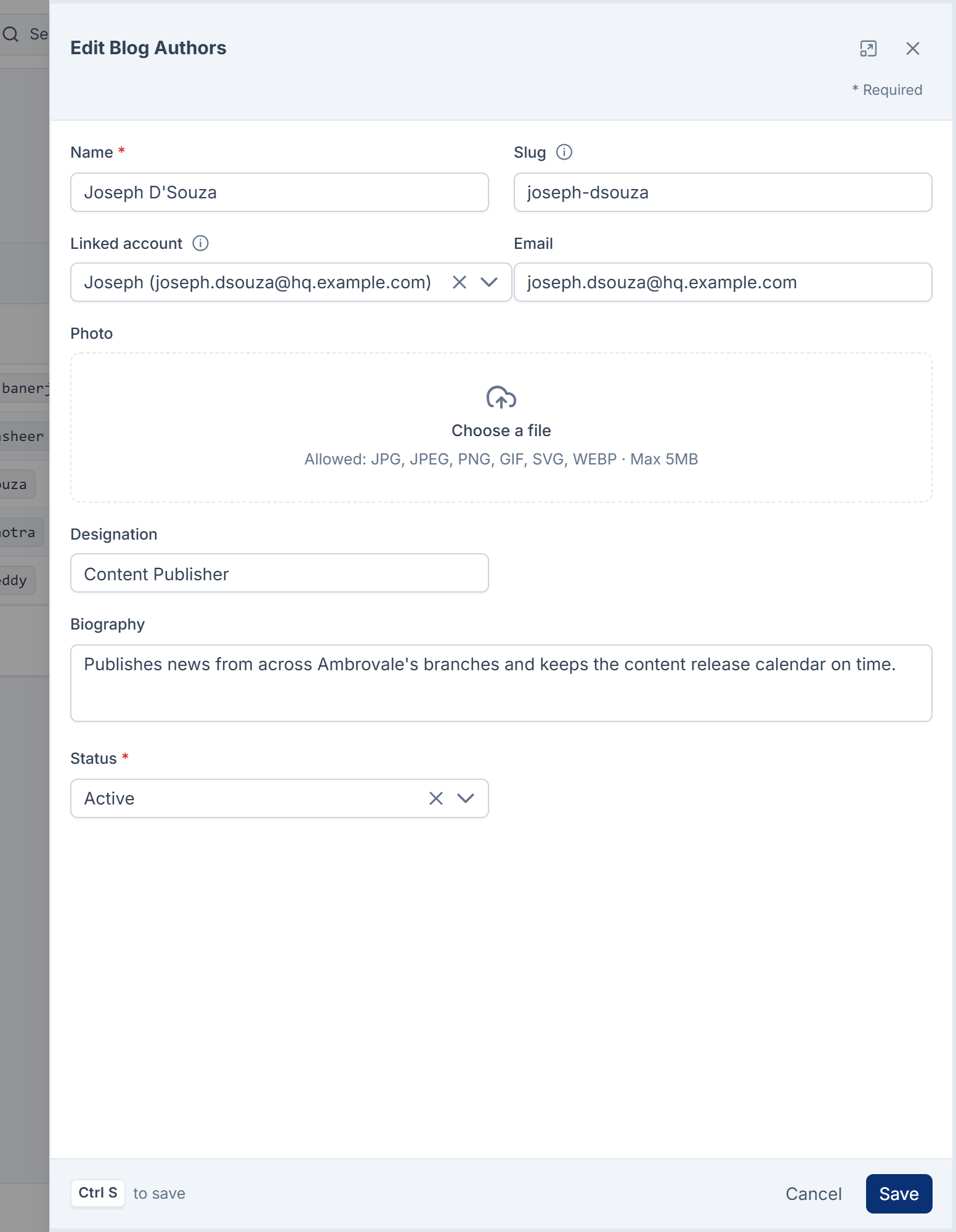
A category's, tag's or author's slug can be changed at any time, and no redirect is added. Anyone who can edit a category, tag or author can change its slug: the Change Slug permissions for categories, tags and authors aren't used in Blog 2.4.1. A category's Visibility set to Private is meant to keep it off your website, but in Blog 2.4.1 your website still receives private categories, as long as they're active. Setting a category's Status to Inactive takes the category itself off your website, but its published articles are still listed there.
Permissions
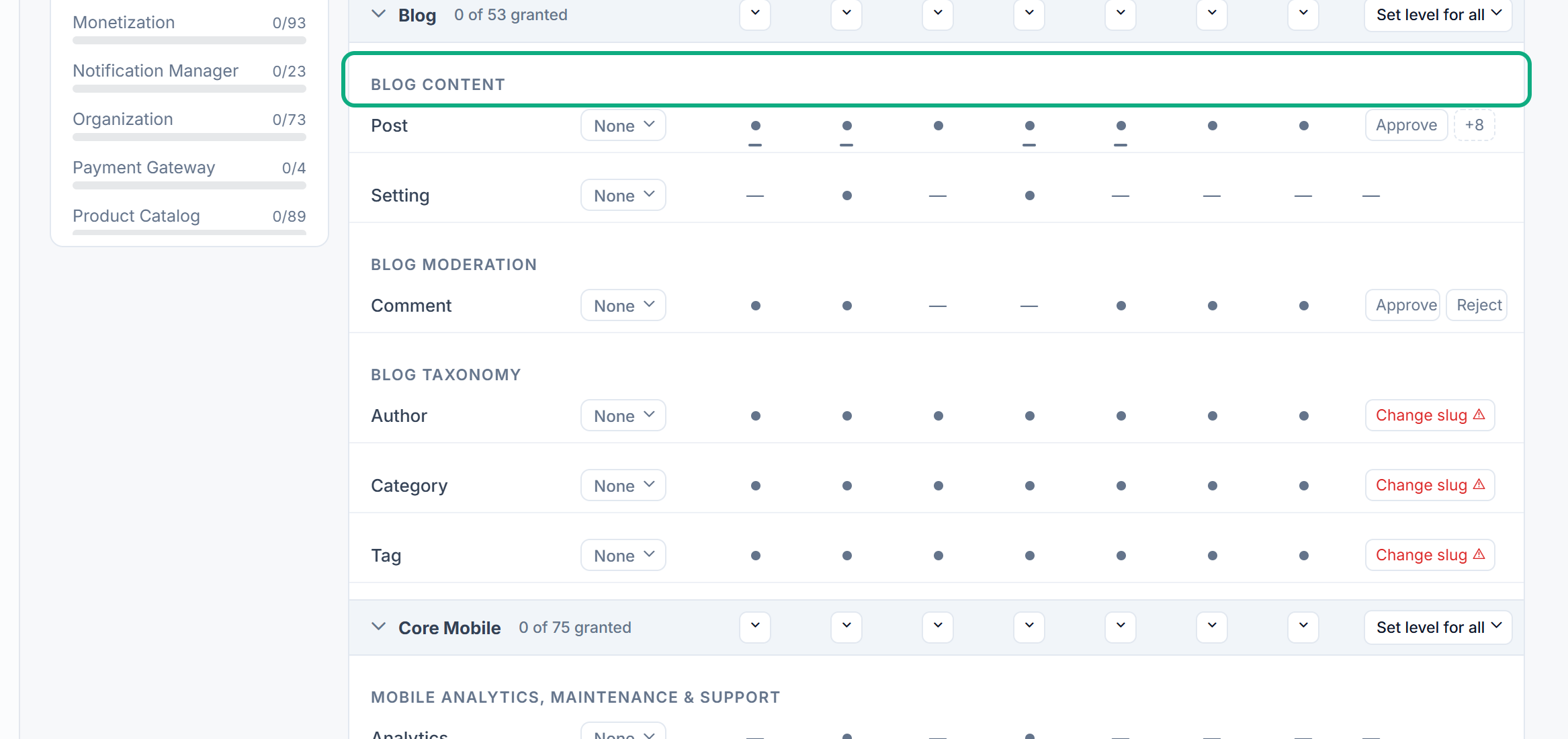
In the role editor, Blog's permissions are in three groups. Each base permission also has an (Own) version where shown, which covers only articles the person created.
Blog Content
| Permission | Label | Allows |
|---|---|---|
feature. | List Post | Opening Blog › Articles. List Post (Own) shows only your own. |
feature. | View Post | Opening an article and its Version history. Has an (Own) version. |
feature. | Create Post | Adding articles. |
feature. | Edit Post | Changing articles, and the everyday workflow steps: Submit for review, and taking a draft back from review, from Rejected or from Scheduled. Has an (Own) version, which covers the form only, not those steps. |
feature. | Delete Post | Moving articles to the trash. Has an (Own) version. |
feature. | Restore Post | Bringing articles back from the trash. |
feature. | Remove Post | Deleting articles forever. Not in the Administrator role. |
feature. | Publish Post | Publish now on a draft or scheduled article. |
feature. | Approve Post | Approve and publish an article that's pending or in review. |
feature. | Reject Post | Reject: sending an article back with a reason. |
feature. | Schedule Post | Schedule a draft. |
feature. | Unpublish Post | Unpublish a published or archived article, back to Draft. |
feature. | Archive Post | Archive a published article. |
feature. | Restore Version Post | Restore this version in an article's version history. |
feature. | Change Slug Post | Change the address of a published or archived article. Not in the Administrator role. |
feature. | Export Post | Nothing in 2.4.1. Export CSV, in the menu next to the list's settings on Blog › Articles, is open to anyone who can open the list, with or without this permission. |
feature. | View Setting | Opening Blog URLs, read-only. |
feature. | Edit Setting | Changing Blog URLs. |
Careful: While an article isn't published, anyone who can edit it can also change its Status on the form, including to Published, without Publish Post or Approve Post. In Blog 2.4.1 the review steps only control the row actions, not the Status field on a draft. Keep this in mind before relying on review to stop articles going live.
Blog Taxonomy
Categories, tags and authors each have List, View, Create, Edit, Delete, Restore, Remove and Change Slug, for example feature. (Create Category), feature. (Edit Tag) and feature. (Delete Author). Remove and Change Slug aren't in the Administrator role.
Blog Moderation
feature. (List Comment, Approve Comment and so on) are there for comments in a later release. They allow nothing in Blog 2.4.1.
To give these permissions, see Give someone a role.
Thanks. That helps us decide what to write next.
Thanks for telling us what was missing.
You already answered for this article today. Thanks.
We got a lot of answers from your network just now. Try again in a few minutes.
We couldn't send that. Check your connection and try again.
Links in this article
Printed from help.laramin.in. The online article may have changed since.