Merge two records for the same person or company
Find likely duplicates of a party, choose which record survives, check what will move, and merge them into one. A merge can't be undone.
- Applies to
- Organization 3.1 and later
- Who can do this
- Administrator
- Permission
feature.org. party. merge - Where
- Organization › Parties
On this page
Before you start
- You need
feature.. In the role editor it's Merge on the Party row. Merging is a separate permission from editing: give it only to people who should make changes nobody can undo.org. party. merge - You can merge from any workspace. A merge changes the shared record, so it reaches every business that deals with either party.
- Open the merge from the record you want to keep. You can swap the two later.
Danger: A merge can't be undone. The record you merge in stops being editable and becomes a pointer to the one you keep.
Steps
-
Open Organization › Parties.
-
Open the row actions menu of the record you want to keep and select Find duplicates. Merge parties opens.
-
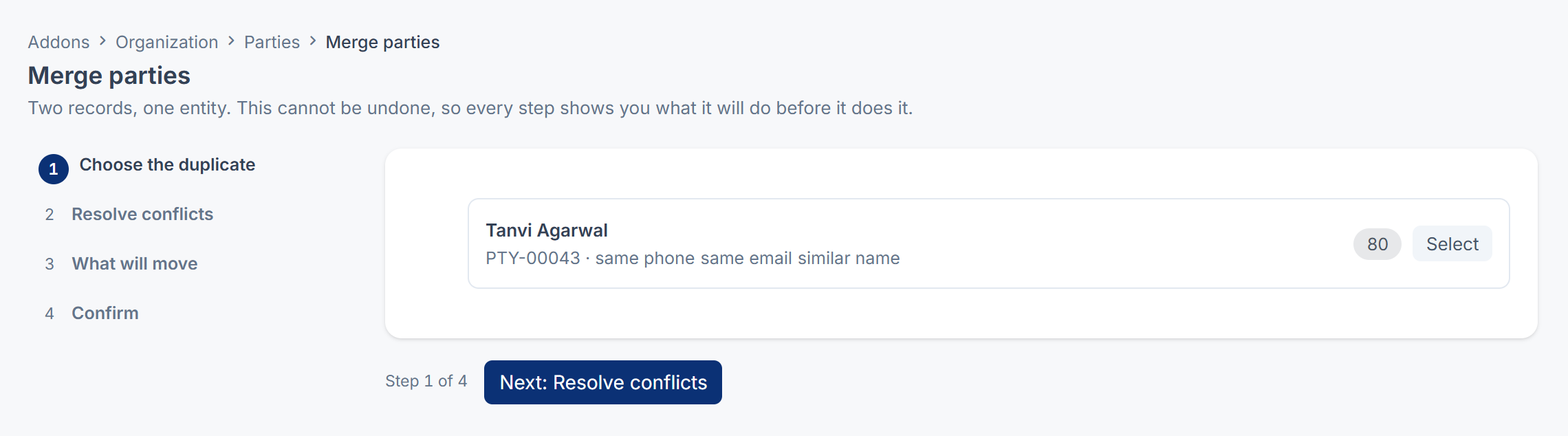
Choose the duplicate. Laramin lists likely duplicates with a score and the reasons, such as same phone or same name. Select Select next to the record to merge in.
-
Select Next: Resolve conflicts.
-
Resolve conflicts. The page names the record that survives this merge. For each field the two records fill in differently, choose which value to keep: Left is the surviving record, Right is the duplicate. Fields filled in on only one side are copied across for you.
- To keep the other record instead, select Swap which one survives. Your choices are cleared, and you're taken back to step 1 to check the pair.
-
Select Next: What will move.
-
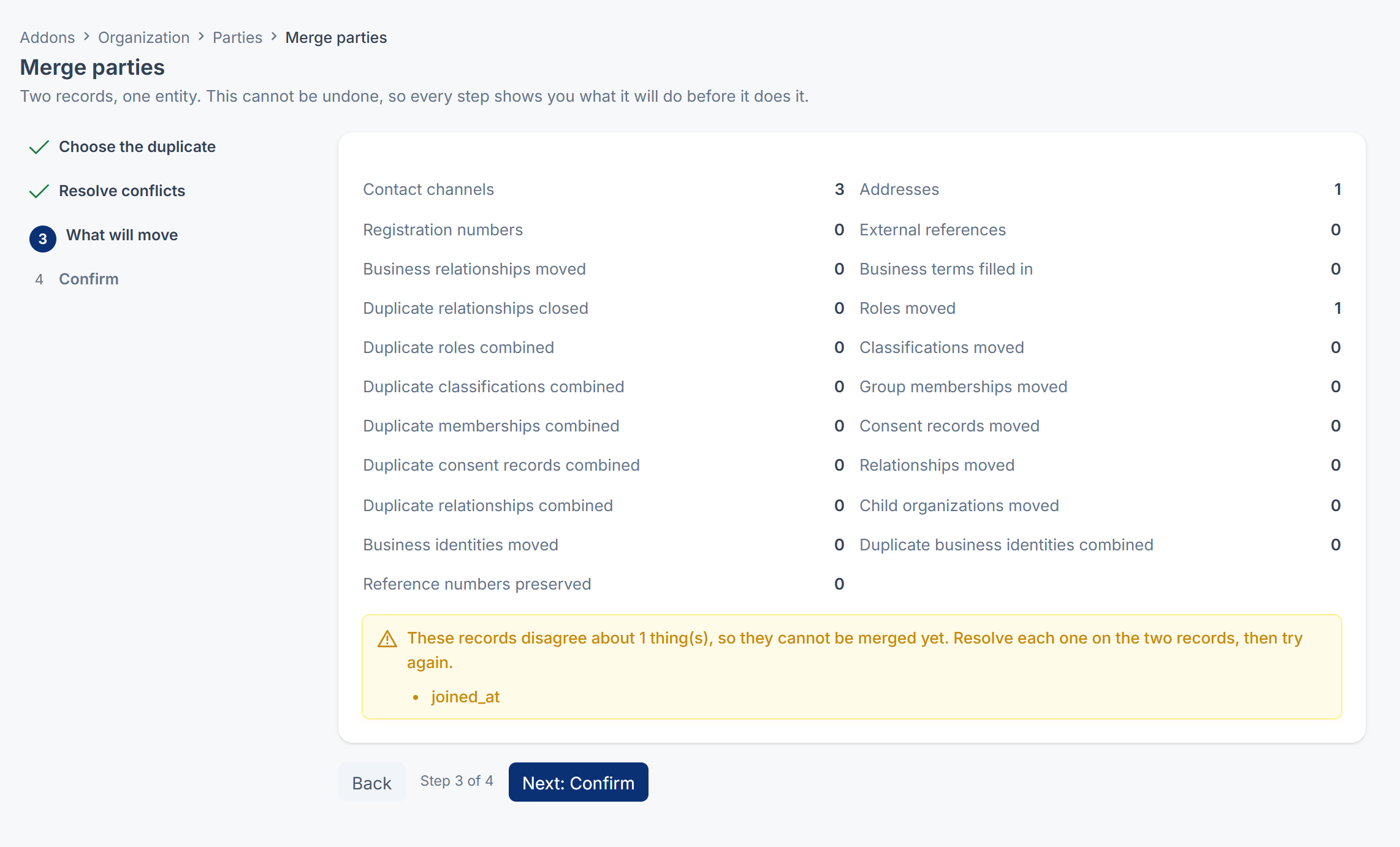
What will move. Check the counts: contact channels, addresses, roles, business relationships, group memberships and the rest. If the two records disagree about something only a person can decide, Laramin says These records disagree about n thing(s), so they cannot be merged yet and lists them. Fix each one on the two records, then start again.
-
Select Next: Confirm.
-
Confirm. Type the party number of the record you're merging in, for example
PTY-00051. -
Select Merge, permanently.
Laramin says Merged. Every reference to the other record now resolves here. and opens the surviving record's Party 360.
What happens next
- The duplicate disappears from the Parties list. Anything that referred to it, in any add-on, now leads to the record you kept.
- Its contact channels, addresses and registration numbers move to the record you kept.
- Its roles, business relationships, segments, group memberships and consent records move too. Where both records said exactly the same thing, they're combined into one, and the spare is kept as history.
If a merge is refused
| Laramin says | What to do |
|---|---|
| These records disagree about n business fact(s)… | The two records have different terms, owners or relationship dates for the same business. Make them agree on the two records' Business Profile or Roles, then merge. |
| These records disagree about n fact(s) about who they are… | Fix the named detail on one of the records, then merge. |
| Both records can sign in. A merge cannot decide which login survives… | Each record has its own login. Retire the account that shouldn't continue, then merge. |
| Type PTY-… exactly to confirm. This cannot be undone. | The confirmation didn't match. Type the duplicate's party number again. |
| The surviving record has itself been merged. Choose the record it was merged into. | Someone merged it already. Start from the record it now points to. |
If the duplicate isn't suggested
Laramin compares records of the same type whose names begin with the same four letters, and suggests one only when the evidence is strong:
| Evidence | Suggested? |
|---|---|
| The same registration number | Yes |
| The same name and the same phone number or email | Yes |
| A similar name and the same phone number and email | Yes |
| The same name only | No |
| The same phone number and email under different names, such as two people in one household | No |
If the duplicate isn't listed, make the evidence match, for example by adding the shared phone number to both records, then select Find duplicates again. Merge parties has no search of its own, so you can only merge a record that Find duplicates suggests.
Thanks. That helps us decide what to write next.
Thanks for telling us what was missing.
You already answered for this article today. Thanks.
We got a lot of answers from your network just now. Try again in a few minutes.
We couldn't send that. Check your connection and try again.
Links in this article
Printed from help.laramin.in. The online article may have changed since.