AI Manager settings and permissions
Every Routing Settings field with its default, the provider and model forms, the fixed limits, and the permissions that control each AI Manager screen and action.
- Applies to
- AI Manager 2.2 and later
- Who can do this
- Platform owner, Administrator
- Where
- AI Manager › Routing Settings
On this page
Routing Settings
AI Manager › Routing Settings opens the AI Routing panel in the Settings hub, under AI Manager. These settings apply to every provider. Change them and select Save changes. See How settings work.
| Section | Field | What it does | Default and range |
|---|---|---|---|
| Failover | Try the next provider on failure | On: when a provider fails, the request goes to the next provider in line. Off: the request fails as soon as its first provider does. | Enabled |
| Retries | Retry attempts | Extra tries against the same provider when a call fails for a reason that may pass: a timeout, a rate limit or the provider being down. A rejected key, a refused request or an empty answer isn't retried. | 2, from 0 to 5 |
| Retries | Backoff (seconds) | How long to wait before a retry, multiplied by the attempt number. When the provider says how long to wait, its time is used instead. | 2, from 0 to 60 |
| Retries | Maximum backoff (seconds) | The longest AI Manager waits before a retry, even if the provider asks for longer. | 30, from 1 to 300 |
| Timeouts | Request timeout (seconds) | Has no effect, although the panel says it applies when a provider has no timeout of its own. AI Manager waits as long as each provider's own Request timeout (seconds), 120 unless you change it. | 120, from 1 to 300 |
| Alerts | Repeat an unresolved alert after (hours) | How long an alert that hasn't changed stays quiet before it's sent again. An alert whose details change is sent at once. | 24, from 1 to 720 |
| Alerts | Warn at this share of a spend limit (%) | Spend above this share of a provider's daily or monthly limit raises a warning. | 80, from 1 to 99 |
| Alerts | Flag spend above this multiple of the usual | Today's spend must reach this many times the recent daily average to raise an alert. | 3, from 1.5 to 100 |
| Alerts | Flag wasted spend above this share (%) | Raises an alert when this share of spend is on retried, failed-over or cut-off calls. | 25, from 1 to 100 |

Careful: Saving the AI Routing panel turns failover off, even though Try the next provider on failure still shows Enabled. Don't save this panel if you rely on failover. If you've already saved it, requests now fail as soon as their first provider fails. Raise a ticket to get it turned back on.
The provider form
AI Manager › AI Providers, then a row's Edit. See Connect an AI provider.
| Section | Field | What it does | Rules and default |
|---|---|---|---|
| Provider | Provider | Which of the supported providers this is. | Chosen when added. Can't be changed. |
| Provider | Display name | How the provider appears in lists and usage records. | Required. Up to 150 characters. |
| Provider | Status | Only Active providers are used. A provider can only be switched on when its required fields are filled in and its add-on is installed. | Inactive when added. |
| Provider | Priority | The order providers are tried in. 1 is first. | Required. From 1 to 100. |
| Provider | Default provider | Tried before every other provider. Only one provider can have it. | Off. |
| Credentials | API key, and the provider's other fields | See Connect an AI provider. Stored encrypted. A blank secret keeps the stored value. | API key is required to switch the provider on. |
| Spending limits | Requests per minute, Daily spend limit (USD), Monthly spend limit (USD) | See Set spending limits and alerts. | Blank means no limit. |

The AI Providers list shows Provider, Display name, Status, Priority, Default provider and Availability. Add the spending limits and Last verified from the columns menu.
| Availability | Meaning |
|---|---|
| Ready | Active, with a key, and under its limits. |
| Inactive | Switched off. |
| No credentials | A required field, usually API key, is empty or can't be read. |
| Over limit | Over its daily or monthly spend limit, or its requests per minute. Requests skip it for now. |
| Driver missing | The add-on that brings this provider is turned off or uninstalled. Its settings and history are kept. |
The model form
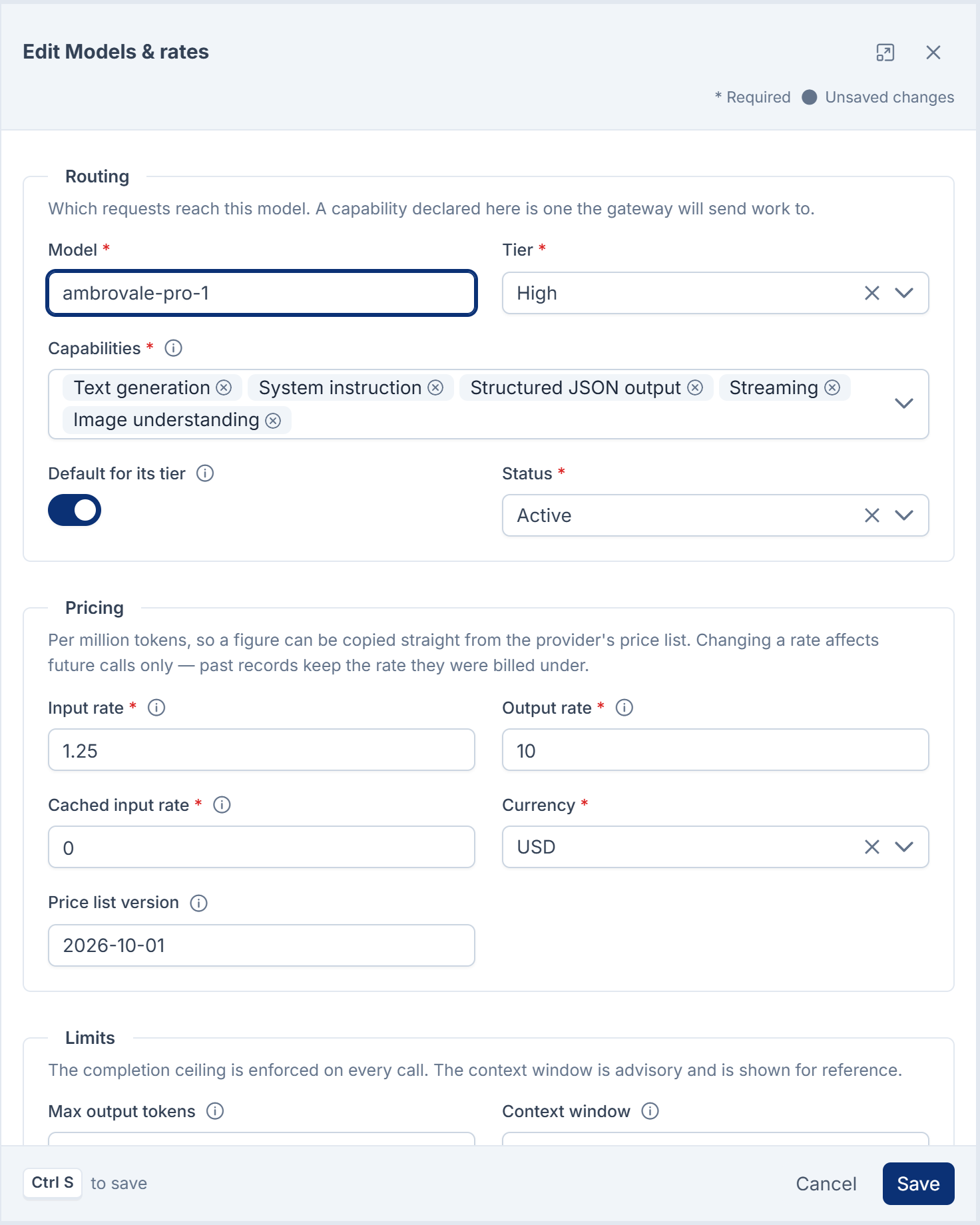
A provider's Models & rates, then a row's Edit. See Set up models and rates.
| Section | Field | Rules and default |
|---|---|---|
| Routing | Model, Tier, Capabilities, Default for its tier, Status | Model up to 128 characters. At least one capability. |
| Pricing | Input rate, Output rate, Cached input rate | US dollars per million tokens, from 0 to 100,000. |
| Pricing | Currency, Price list version | USD only. Version up to 32 characters. |
| Limits | Max output tokens, Context window | Max output tokens is applied to every call. Context window is for reference only. |
Fixed limits
These can't be changed on screen.
| Limit | Value |
|---|---|
| A provider's Request timeout (seconds) | Kept between 5 and 300 seconds. 120 when blank. |
| Test Connection | Waits up to 8 seconds. Reads the provider's model list only. |
| Daily model check | Every day at 04:10, for active providers. Waits up to 20 seconds per provider. |
| Health check and alerts | Every hour. |
| Daily spend limit | Resets at midnight on your Laramin's calendar day. |
| Usage records | Kept until removed from the database. Nothing removes them automatically. |
The daily model check and the hourly health check run with your Laramin's scheduled jobs. Developer Tools › Scheduler shows when each job last ran. If they don't run, see Scheduled jobs don't run.
Permissions
In the role editor, AI Manager's permissions are in three groups: AI Providers & Models, AI Usage & Cost and AI Manager.

| Permission | Label | Allows |
|---|---|---|
feature. | List AI providers | Opening AI Manager › AI Providers. Shows whether each provider has a key, never the key. |
feature. | View an AI provider | Opening a provider's details. |
feature. | Add an AI provider | New provider. |
feature. | Edit an AI provider and its credentials | Changing a provider, including its key, Base URL, status and spending limits. |
feature. | Delete an AI provider | Moving providers to the trash. |
feature. | Restore a deleted AI provider | Bringing providers back from the trash. |
feature. | Permanently remove an AI provider | Deleting providers forever. Their usage records are kept. |
feature. | Run an AI provider connection test | Test Connection. It also needs Edit an AI provider and its credentials: without it, the button is shown but answers This action is unauthorized. |
feature. | List AI models | Opening a provider's Models & rates. |
feature. | View an AI model | Opening a model, and its Stored vs provider page. |
feature. | Add an AI model | New model. |
feature. | Edit an AI model and its rates | Changing a model, Check now and Adopt. |
feature., .restore, .remove | Delete an AI model, Restore a deleted AI model, Permanently remove an AI model | Trash, restore and delete forever. |
feature. | List AI usage and cost | Opening AI Manager › Usage & Cost. |
feature. | View an AI usage record | Opening a usage record. |
feature. | Export AI usage and cost | Exporting usage records to CSV. |
feature. | View the AI overview and spend summary | Opening AI Manager › Overview. |
feature. | View AI routing settings | Opening Routing Settings. |
feature. | Edit AI routing settings | Saving Routing Settings. |
feature. | Receive AI provider and cost alerts | Getting AI Manager's alerts. Grants nothing else. If nobody has it, super admins get the alerts. |
Careful: Edit an AI provider and its credentials lets someone replace keys and send requests, with your content, to another address. Give it only to people you'd trust with your AI spend and your data.
To give these permissions, see Give someone a role.
Thanks. That helps us decide what to write next.
Thanks for telling us what was missing.
You already answered for this article today. Thanks.
We got a lot of answers from your network just now. Try again in a few minutes.
We couldn't send that. Check your connection and try again.
Links in this article
Printed from help.laramin.in. The online article may have changed since.