How AI Manager works
AI Manager is the one place your Laramin talks to AI providers. Add-ons ask it for work, and it picks a provider and model, retries and falls back when one fails, and records what every call cost.
- Applies to
- AI Manager 2.2 and later
- Who can do this
- Platform owner, Administrator
On this page
In short
AI Manager connects your Laramin to AI providers such as OpenAI, Google Gemini and Anthropic. You give it an API key for each provider you use, and it keeps a list of each provider's models and prices.
AI Manager doesn't do anything with AI on its own. Other add-ons use it. Today that's Question Bank, which uses AI to read question papers, analyze questions and write explanations. See Import questions from an exam paper. An add-on never names a provider or a model. It asks for a kind of work at a level of difficulty, and AI Manager decides which provider and model answer, tries again when a call fails, and records what each call cost.
How it works
The parts
| Part | What it is | Where you manage it |
|---|---|---|
| Provider | An AI company's service, with your API key for it. AI Manager can talk to seven: Google Gemini, OpenAI, Anthropic Claude, xAI (Grok), DeepSeek, Alibaba Qwen and Moonshot Kimi. | AI Manager › AI Providers |
| Model | One of a provider's models, with its tier, what it can do, and its price per million tokens. | A provider's Models & rates link |
| Tier | How capable, and how costly, a model is: Simple, Medium, High or Very high. | Tier on each model |
| Capability | A kind of work a model can do, such as Text generation or Image understanding. | Capabilities on each model |
| Usage record | One row for each attempt to call a provider, with tokens, cost and outcome. | AI Manager › Usage & Cost |
When AI Manager is installed, it adds one provider for each of the seven, Inactive and with no key, and fills in each provider's models and prices. You connect a provider by giving it a key and setting it to Active. See Connect an AI provider.
What happens when an add-on asks for AI
- The add-on asks for a capability at a tier, for example Image understanding at High, and sends the instructions and content for the job.
- AI Manager lists every Active model at exactly that tier with that capability, from Active providers. It doesn't use a model from another tier. If there's none, nothing is sent, and the usage record says Skipped.
- It puts them in order: the Default provider first, then the others by Priority, lowest number first. Within one provider, the model marked Default for its tier comes first.
- It skips any provider that's over its daily or monthly spend limit, or its requests per minute. Each skip is recorded.
- It sends the job to the first model. If the call fails for a reason that may pass, such as a timeout, a rate limit or the provider being down, it tries the same provider again, up to Retry attempts times. A rejected key or a refused request isn't retried.
- If that provider still fails, it moves to the next model in the list, unless Try the next provider on failure is off. This is called failover.
- Each attempt, failed or not, becomes a usage record with its tokens and cost.
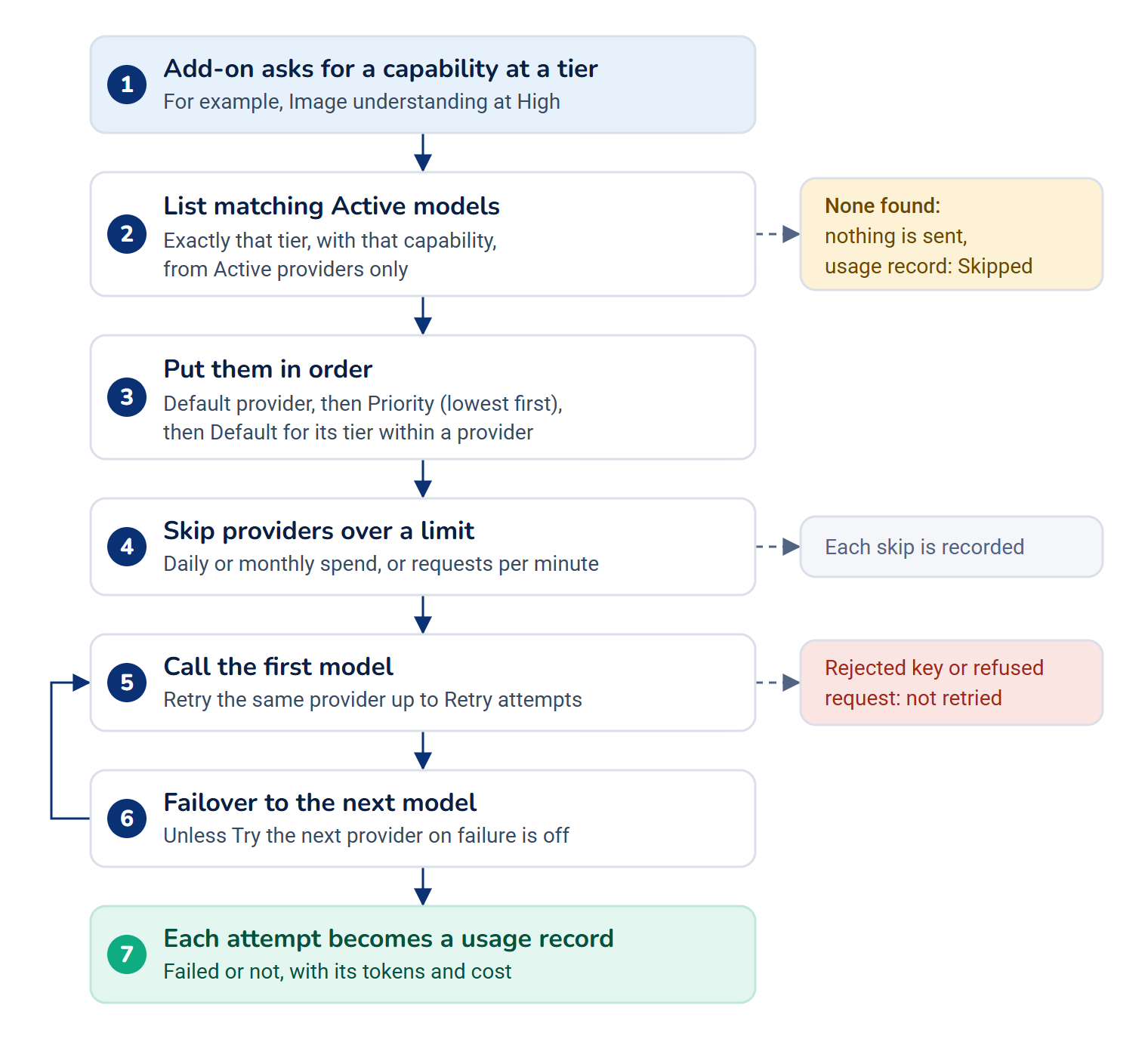
The model's Max output tokens caps how long each answer may be, so one call can't run up a large bill. The settings for steps 5 and 6 are in AI Manager › Routing Settings. See AI Manager settings and permissions.
How cost is worked out
Providers report how many tokens each call used. AI Manager multiplies them by the model's rates, which are in US dollars per million tokens, and stores the figure on the usage record with the rates it used. Changing a rate affects later calls only. These figures are estimates from your own rate cards, not the provider's bill. See Track AI usage and cost.
Checks in the background
Two jobs run on your Laramin's scheduler while AI Manager is on:
- Every hour, it reads the usage records and spend limits, and raises an alert when, for example, spend nears a limit or requests keep failing over.
- Every day at 04:10, it asks each active provider for its list of models, and marks models the provider no longer lists, or whose published details differ from yours.
Neither job sends any of your content. If the scheduler isn't running, they don't run. See Set spending limits and alerts.
How it relates to
- Your data. Each request carries the content the add-on needs for the job. Read What AI Manager sends to providers, and where it keeps your keys before you connect a provider.
- Permissions. Each screen and action has its own permission. See AI Manager settings and permissions, and give them with a role: Give someone a role.
- Workspaces. Providers, models and usage records are shared by your whole Laramin, not kept per workspace.
- Turning AI Manager off. Add-ons that use AI skip their AI step while it's off. Providers, keys and usage records are kept. See Disable or delete an add-on.
Next steps
Thanks. That helps us decide what to write next.
Thanks for telling us what was missing.
You already answered for this article today. Thanks.
We got a lot of answers from your network just now. Try again in a few minutes.
We couldn't send that. Check your connection and try again.
Links in this article
Printed from help.laramin.in. The online article may have changed since.