How Question Bank works
Question Bank holds exam questions filed by exam board, topic and sub topic, turns them into mock tests, and lets staff review each attempt. Here's how the pieces fit, and what works on screen today.
- Applies to
- Question Bank 3.5 and later
- Who can do this
- Platform owner, Administrator, Team member
On this page
In short
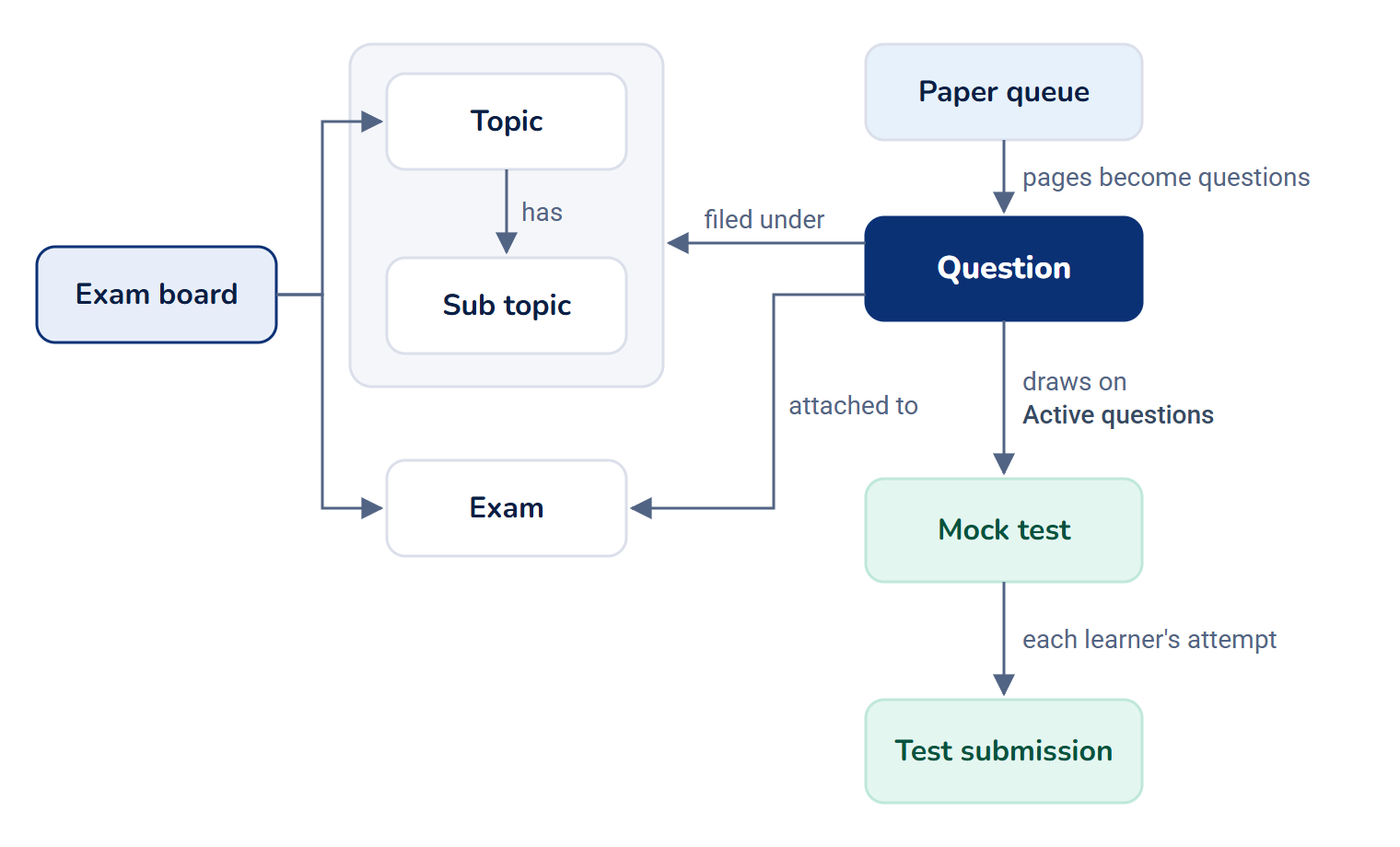
Question Bank is a store of exam questions. You file each question under an exam board, a topic and a sub topic, and attach it to the exam paper it came from. You then build mock tests from those questions, and see how each learner did.
Two kinds of people use it:
- Staff, such as administrators and teachers, build the bank and the tests on the screens under Question Bank in the sidebar. What each person can do depends on the permissions in their role.
- Learners have My Tests, a page outside the admin. They need no Question Bank permission.
Careful: In Question Bank 3.5.2, learners can't take a test. The test player was removed in 3.4.0 and hasn't been replaced, so nothing offers a way to start one, and no new submissions are recorded. My Tests also opens empty: learners see only its title and their name, not their tests or earlier results. See A test can't be taken or has no questions.
How it works
The parts
| Part | What it is | Where you manage it |
|---|---|---|
| Exam board | The body that sets exams, such as a state public service commission. Topics and exams hang off a board. | Question Bank › Exam Boards |
| Topic | A subject area within one board, such as History. | Question Bank › Topics |
| Sub topic | A narrower area within one topic, such as Modern India. | Question Bank › Sub Topics |
| Exam | One exam paper, such as a particular year's prelims, with its year, code and the languages it's published in. | Question Bank › Exams |
| Question | One question, with its answer choices, in every language the exam is published in. | Question Bank › Questions |
| Paper queue | A page of an exam paper (an image, HTML or JSON) waiting to be read by AI and turned into questions. | Question Bank › Paper Queue |
| Mock test | A set of questions learners sit as a test, with rules for how often they can take it. | Question Bank › Mock Tests |
| Test submission | One learner's attempt at a mock test, with their answers and timings. | Question Bank › Test Submissions |
Exam boards, topics and sub topics are shared by everyone who works on the bank. Exams, questions, paper queues, mock tests and submissions belong to the person who created them, so a role can be limited to its holder's own records with the Own permissions.
Question types
| Type | What the learner sees |
|---|---|
| Multiple Choice Questions | A question and a list of answer choices. |
| Paired MCQs | Answer choices that each pair two items, such as a term and its meaning. |
| Multiple Statements (MCQ) | Numbered statements, then choices such as "1 and 2 only". |
| Chronological Order | Events to put in order, then choices that give an order. |
| Match the Following (MCQ) | Two columns of items to match, then choices that give the matches. |
| Match the Pairs (MCQ) | A list of pairs, some correctly matched, then choices about which are correct. |
| Assertion and Reason | An assertion and a reason, then the standard choices about whether each is true and whether the reason explains the assertion. |
Every type ends in answer choices the learner picks from. A question that's Active must have at least two choices, with at least one marked correct, so it can be scored.
Languages
Every piece of question text can be written in each language your Laramin runs (see Add a language). An exam's Available languages narrows that list, so its questions only offer the languages the paper is published in. Leave it empty to offer every language.
Where questions come from
- Written by hand in the question builder. See Write a question in the question builder.
- Imported from an exam paper with Paper Queue: AI reads each page and extracts the questions, you check them, and you import them. This needs an AI provider set up in the AI Manager add-on. See Import questions from an exam paper.
- Loaded from past papers that ship with the add-on. Your platform owner loads them from the command line with
php artisan questionbank:seed-. This adds thousands of questions, boards, topics and exams at once, so it's a decision for the whole installation.content
Mock tests and attempts
A mock test's questions come from rules (the exams, question types, category and number of questions to include) or are picked by hand on the Questions list. Only Active questions count.
Once any learner has sat a test, its questions are frozen: you can still rename it or change its attempt rules, but not its questions, because learners' stored answers would change meaning.
Each test says how many attempts a learner gets (No. of Revisions, where 0 means unlimited), how many days they must wait between attempts (Revision Interval (in Days)), and whether a learner's result includes the correct answers (Expose Answer). There's no pass mark: results are a score and an accuracy, not pass or fail.
Learners and My Tests
Anyone who can sign in to your Laramin can open My Tests, at /qb/tests. In Question Bank 3.5.2 it opens empty, with only its title and the learner's name, and so do learners' result pages: learners can't see their tests or their results there. Tests aren't assigned to particular learners. A learner can only open their own result pages; anyone else gets a "not found" page.
Staff see every attempt, with its score, timings and analytics, on Question Bank › Test Submissions, and can tell learners how they did. See Review test submissions and analytics.
What you can do on screen today
| You can | You can't |
|---|---|
| Set up exam boards, topics, sub topics and exams | Have learners take a test, or see their tests and results on My Tests |
| Write, edit, re-file and delete questions in every published language | Assign a test to particular learners |
| Import questions from a paper with AI, check them and import them | Upload several page images at once into Paper Queue |
| Build mock tests from rules or from a selection of questions | Start AI extraction from the Paper Queue list (see Import questions from an exam paper) |
| Export a selection as a printable question paper and an OMR answer sheet | |
| Read each submission's score, timings and analytics |
How it relates to
- AI Manager. Paper Queue extraction runs through the AI provider set up there. Without one, a paper is marked Skipped (no AI) and nothing is charged. See How AI Manager works.
- Custom Fields. Fields you add for exam boards, topics, sub topics, exams, questions, paper queues and mock tests appear on their forms. Fields for the parts of a question (options, statements and so on) appear nowhere. See How custom fields work.
- Notification Manager. Question Bank adds three notifications: Mock Test Assigned, Mock Test Completed and Question Added to Exam. See Turn a notification on or off.
- Permissions. Each screen and action has its own permission. See Question Bank fields and permissions.
- The sidebar. The Question Bank menu is in the Platform Administration experience's sidebar only. Someone who can't enter Platform Administration has no menu path to it. See Switch to another experience.
- Turning it off. Question Bank declares its data archived on uninstall: its tables are exported on the server before anything is removed. See Disable or delete an add-on.
Next steps
Thanks. That helps us decide what to write next.
Thanks for telling us what was missing.
You already answered for this article today. Thanks.
We got a lot of answers from your network just now. Try again in a few minutes.
We couldn't send that. Check your connection and try again.
Links in this article
Printed from help.laramin.in. The online article may have changed since.