How add-on licensing works
How Laramin tells free add-ons from paid ones, what happens when you activate a license, how licenses are re-checked every day, and what each license status means.
- Applies to
- Core 12.0 and later
- Who can do this
- Platform owner
On this page
In short
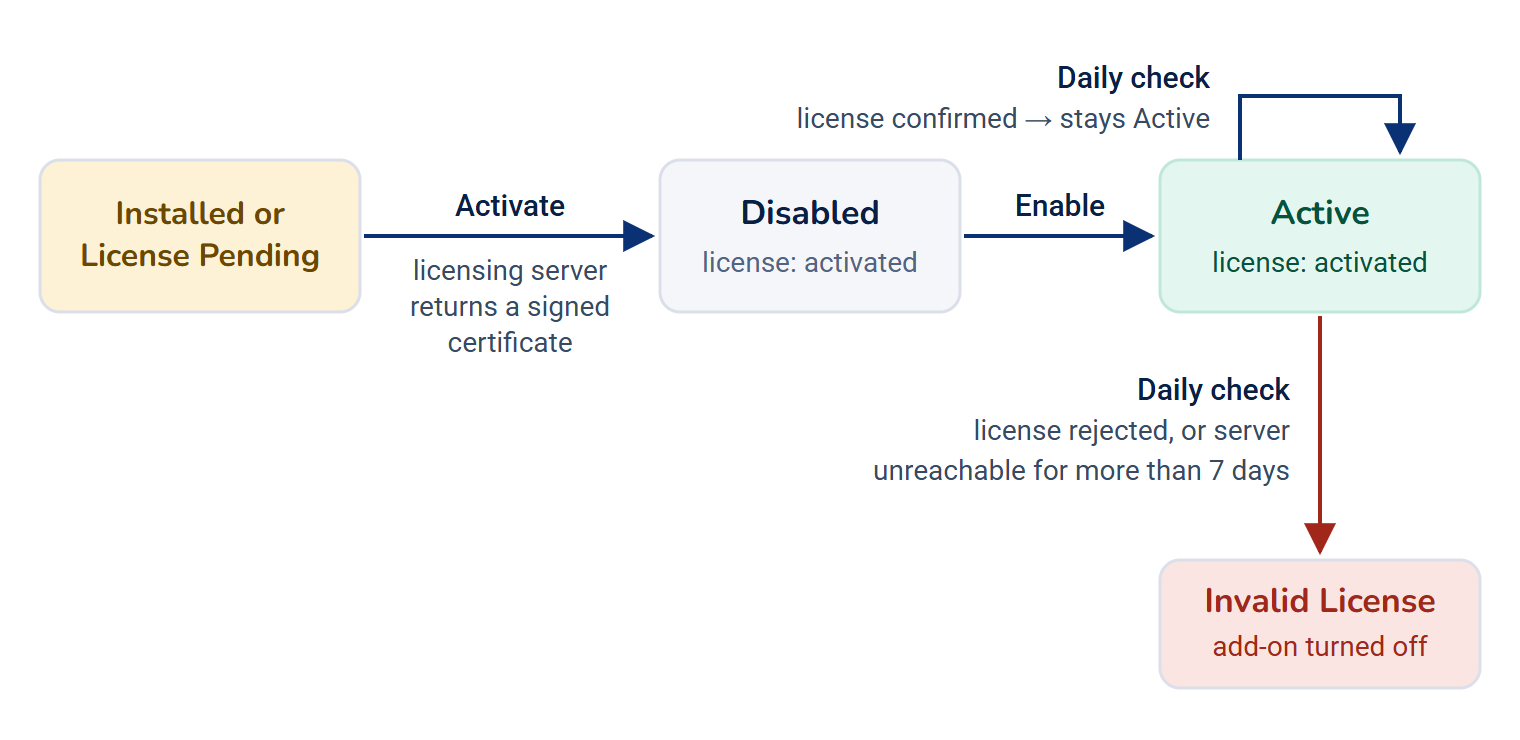
Free add-ons work as soon as you install them. A paid add-on installs, then waits in License Pending until you activate it with its purchase email and license key. Laramin checks the key with the licensing server, stores a signed certificate tied to your installation, and re-checks it once a day. If the license is rejected, or the server can't be reached for more than seven days, the add-on goes to Invalid License and is turned off.
How it works
Free or paid
Each add-on declares a type in its module.json file. You see it in the Type column on Addons › Addon Management.
- An add-on whose type is
commercialis paid. So is the older type namepaid. - Everything else, including
freeandcore, is free.
Free add-ons never need a license, and the daily check skips them. After installation they're activated and enabled straight away. If a free add-on ever shows License Pending or Invalid License, the add-on console corrects the status the next time it loads the list. It doesn't switch on a free add-on that you disabled.
Activating a paid add-on
When you select Activate and enter Purchase Email and License Key, Laramin sends four things to the licensing server:
- the license key,
- the email address,
- the add-on's name, and
- an installation ID.
The default licensing server is https://licenses.laramin.com. Your server needs outbound HTTPS access to it.
If the server accepts the license, it returns a signed certificate. Laramin stores it, and the add-on's license status becomes activated. The add-on is now licensed but not yet switched on. Its status reads Disabled until you select Enable.
The certificate is tied to this installation
The installation ID is calculated from your application key (APP_KEY) and your site address (APP_URL). Whenever Laramin enables or loads a paid add-on, it checks that the certificate:
- hasn't been tampered with,
- was issued for this installation ID,
- was issued for this add-on, and
- hasn't expired.
If you move Laramin to a new address or change the application key, existing certificates no longer match. Paid add-ons then stop loading until you activate their licenses again. Laramin has no action to release a key from the old installation. [Confirm: whether the license server accepts the same key for the new installation. If it refuses, contact Brine Webs support.]
The daily check
Every day, the scheduler re-checks the license of every activated paid add-on with the licensing server:
| What the server does | What happens to the add-on |
|---|---|
| Confirms the license | It stays active. Laramin records the date of the check. |
| Rejects or revokes the license | Its status becomes Invalid License and it's disabled. |
| Can't be reached | Laramin allows a 7-day grace period, counted from the last successful check. After 7 days, the status becomes Invalid License and the add-on is disabled. |
The check only runs if your Laramin's scheduled jobs run. Developer Tools › Scheduler shows when each job last ran. If they don't run, see Scheduled jobs don't run.
Licenses and upgrades
A paid add-on can only be upgraded while its license is activated, whether you upload a ZIP or apply files already on the server. Otherwise the upgrade stops with Upgrade blocked: an active licence is required for this add-on. Free add-ons upgrade without a license.
License status values
The License line in an add-on's Details shows the stored value:
| Value | Shown in Status as | Meaning |
|---|---|---|
imported | Imported | Files are in place. Nothing is installed yet. |
installing | Installing | The install job is running. |
installed | Installed | Installed, waiting for a license. |
license_pending | License Pending | A paid add-on is installed and waiting for its license. A free add-on in this state is corrected automatically. |
activated | Active or Disabled | Licensed, or free. It shows Active while it's enabled and Disabled while it's turned off. |
invalid_license | Invalid License | The license was rejected, or the grace period ran out. The add-on is turned off. |
failed | Failed | An install or uninstall didn't complete. |
deleting | Deleting | The uninstall job is running. |
updating | Updating | An upgrade is in progress. |
How it relates to
- Add-on statuses: the full list of statuses and the actions each one offers. See Add-on statuses and actions.
- Permissions: activating a license needs
feature.. Like everycore. addon. activate feature.permission, it isn't part of the standard Administrator role.core. addon. *
Next steps
Thanks. That helps us decide what to write next.
Thanks for telling us what was missing.
You already answered for this article today. Thanks.
We got a lot of answers from your network just now. Try again in a few minutes.
We couldn't send that. Check your connection and try again.
Links in this article
Printed from help.laramin.in. The online article may have changed since.