File upload settings
The file types and the largest file size allowed for images, documents, archives and every other upload, with the defaults a new installation starts with.
- Applies to
- Core 12.0 and later
- Who can do this
- Administrator, Platform owner
- Where
- Configurations › General Settings › File Uploads
On this page
The Uploads panel sets what people may upload in Laramin's file fields. You need feature. to change it. Each field that accepts a file uses one of four groups, called upload profiles. A logo field, for example, uses Images.
| Section | Field | Default | Notes |
|---|---|---|---|
| Images | Image Extensions | jpg, jpeg, png, gif, svg, webp | Suggestions include bmp, avif and ico. |
| Image Max Size | 5MB | ||
| Documents | Document Extensions | pdf, doc, docx, xls, xlsx, csv, txt | Suggestions include ppt, pptx, odt and rtf. |
| Document Max Size | 10MB | ||
| Archives | Archive Extensions | zip, rar, 7z, gz, tar | Suggestions include bz2. |
| Archive Max Size | 50MB | ||
| Default | Default Extensions | jpg, jpeg, png, gif, svg, webp, pdf, doc, docx, zip | Used by any file field that doesn't name one of the groups above. |
| Default Max Size | 10MB |
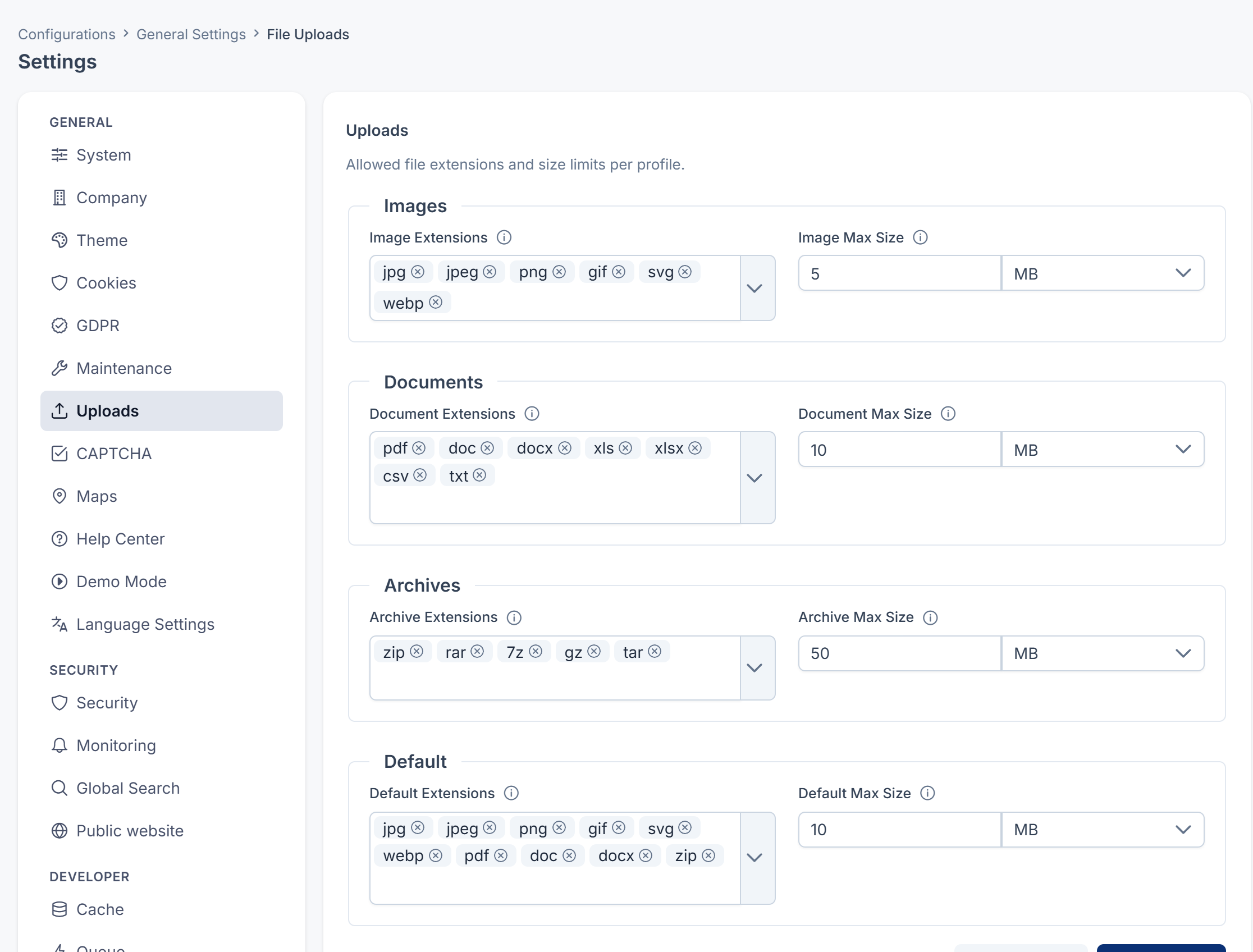
How to fill in the fields
- Extensions: type each extension without the dot, for example
jpg, and press Enter. You can pick from the suggestions or add your own. Up to 1,000 characters in all. - Max size: enter a positive number and choose KB, MB or GB, for example 5 MB. Decimals are allowed. Anything else is refused with Enter a positive number followed by KB, MB or GB.
A field left empty uses the default shown in the table. The panel shows the default when nothing has been saved yet.
What these settings don't change
Some uploads keep fixed limits of their own, whatever you set here:
| Upload | Allowed | Largest file |
|---|---|---|
| App icon on the System panel | png, webp | 2MB |
| A static option's Image | jpg, jpeg, png, svg, webp | 2MB |
| An addon package | zip | 100MB |
A CSV import has its own limit of 10 MB.
Your server has an upload limit of its own (PHP's upload_ and post_max_size), and a file over it is refused whatever you set here. If large uploads fail, ask whoever manages your server to raise it. [Confirm: the server upload limit on hosted installations.]
Careful: Allowing svg lets people upload images that can contain scripts. Only allow it if you trust everyone who can upload.
Thanks. That helps us decide what to write next.
Thanks for telling us what was missing.
You already answered for this article today. Thanks.
We got a lot of answers from your network just now. Try again in a few minutes.
We couldn't send that. Check your connection and try again.
Links in this article
Printed from help.laramin.in. The online article may have changed since.