How the Headless CMS delivers your content
Content spaces, schemas, assignments, entries, channels and API access, and the eight checks an entry passes before a website or app receives it. Start here.
- Applies to
- Headless CMS 1.0 and later
- Who can do this
- Administrator, Team member, Developer
On this page
In short
The Headless CMS keeps content that your websites and apps show, such as a site header, a list of FAQs or your services. An administrator decides the shape of each kind of content once, as a content schema. Editors fill it in and publish it, language by language. Websites and apps then read what's published through one delivery API. A draft never reaches them, and changing a schema never quietly breaks an app that reads it.
"Headless" means the CMS has no pages or theme of its own. It only holds and delivers the content. Each website or app decides how to show it.
How it works
The parts
| Part | What it is | Where you manage it |
|---|---|---|
| Content space | A group of content that belongs together, usually one per website, app or audience, for example company. It has its own languages and decides who may read it: Public (anyone) or Restricted (only applications you grant). | Headless CMS › Content spaces |
| Content schema | The shape of one kind of content: its fields, such as a title, an image and a description. A Single holds one record per space, such as a site header. A Collection holds a list, such as FAQs. | Headless CMS › Content schemas |
| Assignment | A schema given to a space. Each space gets its own, empty content for the schema, so one schema can serve many spaces without sharing content. | Headless CMS › Assignments |
| Entry | One record of content: the Single's record, or one item of a Collection. It has a draft and a published copy for each language. | Headless CMS › Content |
| Channel | An optional medium that reads your content, such as Web, Android or Kiosk. An editor can show an entry on some channels only. A channel never decides who may read. | Headless CMS › Delivery › Channels |
| API access | Which application may read which space, and its default channel. The applications and their keys live in Core, under Developer Tools › API Consumers. | Headless CMS › Delivery › API access |
Each space has a delivery address for each schema, for example https://laramin.example.com. Applications call that address and receive JSON. See Delivery API: addresses, parameters and responses.
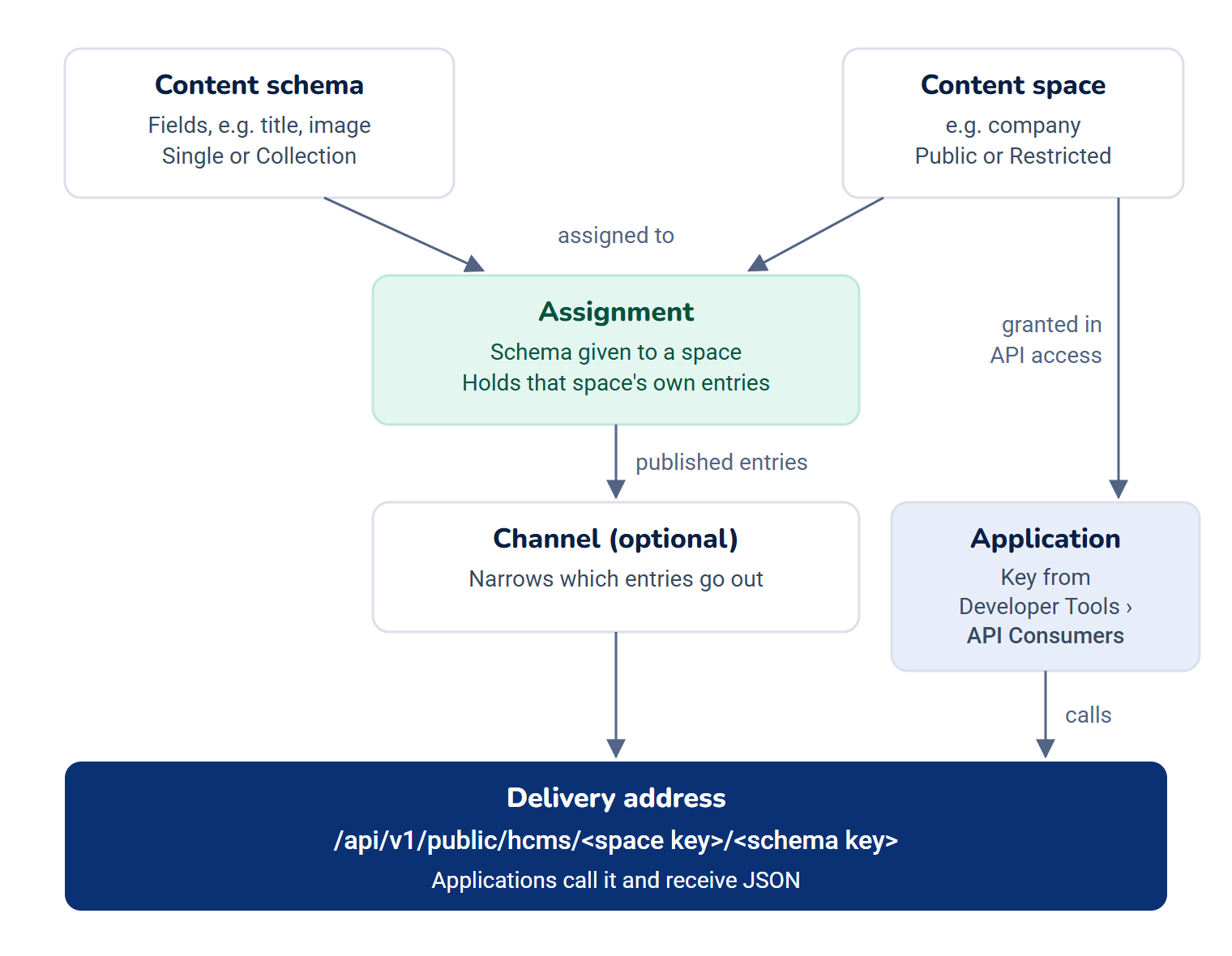
From a draft to an application
- An editor opens Headless CMS › Content, chooses the space, and fills in an entry. Save draft keeps the work. Applications don't see drafts.
- Someone with permission to publish selects Publish for a language. Applications receive that language from their next request.
- Later edits are a new draft. Applications keep receiving the published copy until someone publishes again.
The eight checks
An entry reaches an application only when all eight checks pass, in this order:
- The content space is active.
- The application may read the space: any caller on a Public space, a granted application with a key on a Restricted one.
- The content schema is active.
- The schema's Delivery through the API is on.
- The schema is assigned to the space, and not removed from it.
- Delivery is on for that assignment.
- The entry is published in the language asked for, or falls back to one that is.
- The entry is shown on the channel asked for.
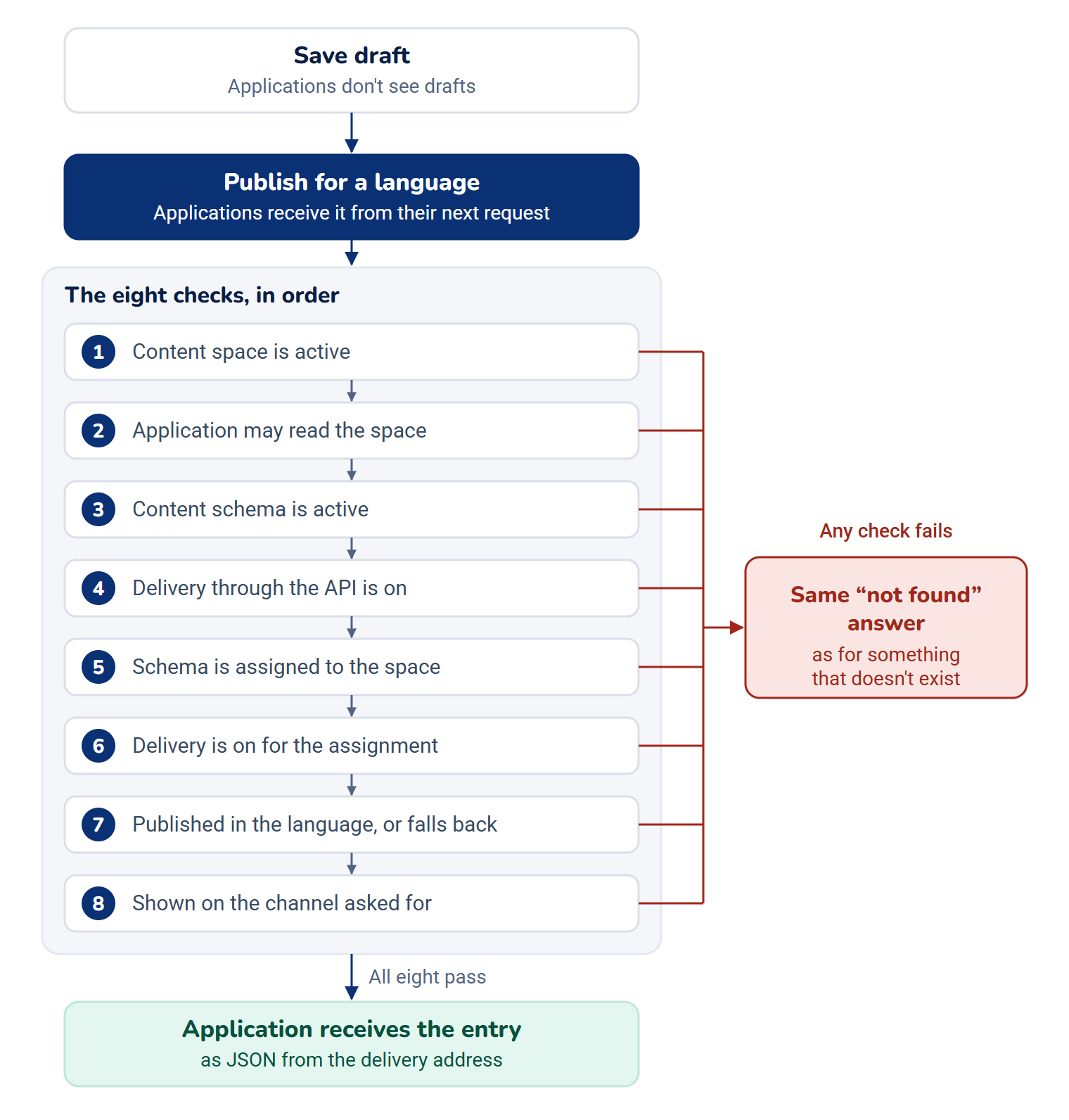
When any check fails, the application gets the same "not found" answer as for something that doesn't exist, so nothing hidden is revealed. The screens show which check fails: the Assignments matrix names the first failing check for each space and schema, and the API explorer shows all eight. See An application doesn't receive your content.
Languages
A space offers one or more languages, chosen from the content languages your Laramin publishes, and one of them is its default. Each field is Translatable (a value per language) or Shared (one value for every language). Each language is published on its own. If a language has nothing published, applications can receive the default language's copy instead, while Fall back to the default language is on. See Translate content into your other languages.
If your Laramin publishes no content languages, the Headless CMS works in one language and hides its language controls. Translations already stored are kept.
Versions
The first time content from a schema is published, the schema's shape is locked at version 1.0, because applications may now depend on it. Adding a field is still safe and applies at once. A change an application could notice, such as renaming or removing a field, waits and is published on purpose as a new version, while the old version keeps being served. See How schema changes and versions keep applications working.
Your website's own pages
A website add-on can show published content on its own pages. It reads from the content space chosen in Configurations › Security › Public website, under Content space. Only Public, active spaces can be chosen, and those page views run the same eight checks without being counted as API calls. See Choose what your website's home page shows.
Undo and confirmations
A change that affects what applications receive asks first, and the dialog says exactly what it affects, such as the addresses that will answer "not found". Most changes can then be undone from the message that appears, for a few seconds (8 by default). Changes that can't be undone, such as removing something for good, ask you to type a word to confirm.
Who does what
The Headless CMS brings three roles. They're given to nobody when it's installed, and installing it gives Core's Administrator role none of its permissions, so an administrator gives them out. See Give someone a role.
| Role | Can |
|---|---|
| CMS Administrator | Everything in the Headless CMS: spaces, schemas, assignments, channels, API access, settings and content. |
| Content Editor | See spaces and schemas, write, trash and restore entries, and preview drafts in the API explorer. Can't publish. |
| Content Publisher | Everything a Content Editor can, plus publish and unpublish. |
Two permissions are never part of Core's Administrator role and must be given on purpose, because they can't be undone for any reader of the API: Retire a version (feature.) and Emergency stop a field (feature.). Every permission is listed in Headless CMS settings.
Where to find it
The Headless CMS menu holds Content spaces, Content schemas, Assignments, Content, Delivery (with Channels, API access and API explorer) and Settings. Each item shows only to people whose permissions allow it.
The Headless CMS menu is in the Platform Administration experience's sidebar only. A Content Editor or Content Publisher who can't enter Platform Administration has no menu path to Content. See Switch to another experience.
Two keyboard shortcuts open the busiest screens: g then c for Content, and g then a for Assignments. Spaces and schemas also show in the admin search, by name or key.
How it relates to
- Webhook Engine: when it's installed, the Headless CMS offers it seven events, such as
hcms.andentry. published hcms.. They carry ids, keys and versions, never content, so a receiving system fetches the content through the API.delivery. changed - Activity Log: when it's installed, each space, schema and grant shows a history of who changed what. Without it, a schema's change log still lists every version.
Next steps
Thanks. That helps us decide what to write next.
Thanks for telling us what was missing.
You already answered for this article today. Thanks.
We got a lot of answers from your network just now. Try again in a few minutes.
We couldn't send that. Check your connection and try again.
Links in this article
Printed from help.laramin.in. The online article may have changed since.