Emails from Laramin don't arrive
A password reset, a verification code or an add-on's alert never arrives, although the screen said it was sent. Find which of Laramin's two ways of sending carried it, and fix that one.
- Applies to
- Core 12.7 and later
- Who can do this
- Platform owner, Administrator
On this page
Symptom
Someone expected an email from your Laramin and it never came. The screen gave no sign of a problem: a password reset still says Check your inbox, and an administrator's Reset password still says "Password reset link has been sent to …".
Two ways your Laramin sends email
Which way an email went decides where to look:
| Sent by | Which emails | Where a failure shows |
|---|---|---|
| Notification Manager, when it's installed and turned on | Every business event: password reset links, temporary passwords, and every add-on's alerts | A row in Notification Manager › Logs |
| Laramin's own mailer, always | Codes from the mobile app (sign-up, verification and password reset), monitoring alerts, email address verification links, and, when Notification Manager is off, password resets and a few account-security messages | Only the server's log |
Without Notification Manager, the temporary password from Set password and every add-on's alert are never emailed at all.
Check these, in order
1. Notification Manager still has its placeholder mail server
Notification Manager installs its SMTP email provider as Active, pointing at a placeholder mail server (127.0.0.1, port 1025). Until someone enters a real mail server, every email it sends fails. Password resets that worked before Notification Manager was installed stop, because it takes them over.
In Notification Manager › Logs, the email rows show Failed, with an Error Message that starts Connection could not be established with host "127.0.0.1:1025".
Fix: enter your real mail server. Open the Settings hub, then Notification Providers › Email Settings, and fill in the SMTP tab. See Connect an email, SMS, WhatsApp or push provider. If saving is refused, see A delivery provider won't switch on.
If your Laramin was installed with Core 12.8.1 or earlier
Installing locked away Notification Manager's starting email details in a form Laramin can't read. On Email Settings, SMTP Host, SMTP Port, SMTP Username, From Address and From Name look empty although nobody cleared them, and Status still shows Active. The log rows show Connection could not be established with host ":587", with no host before the port. Upgrading to 12.8.2 doesn't repair this by itself.
Fix:
-
Ask whoever runs your server to run this command. It changes nothing; it lists every saved value Laramin can't read.
BashCouldn't copy. Select the code and press Ctrl+C (⌘+C on a Mac).
php artisan app:check-encrypted -
If it lists
nm_providerswithsmtp, open Email Settings (you need Edit Providers & Settings). On the SMTP tab, fill in every field: SMTP Host, SMTP Port, Encryption, SMTP Username, SMTP Password, From Address and From Name. Type the password even if you think it's saved: an empty box keeps the unreadable one. Do the same on AWS SES ifsesis listed.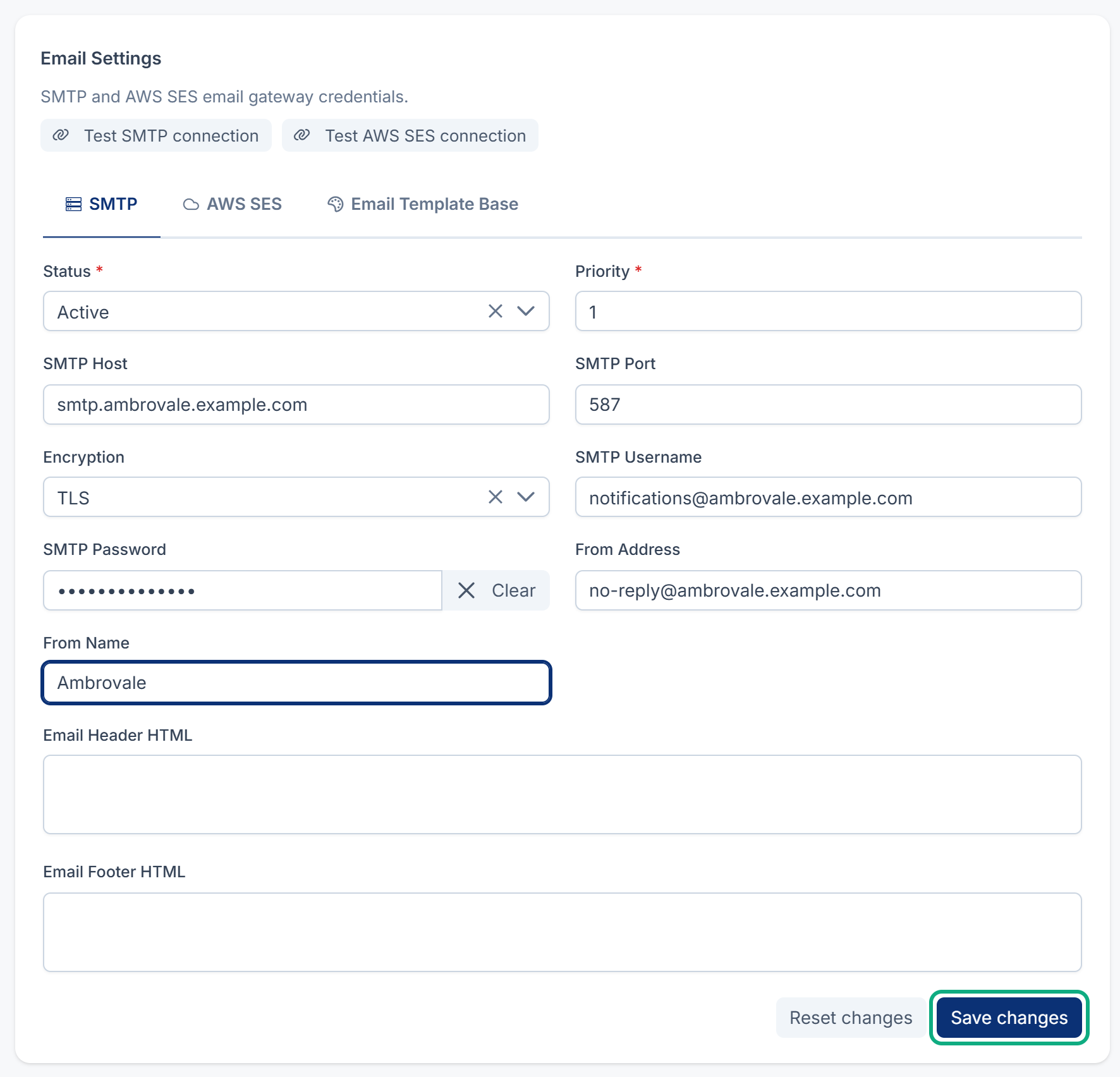
-
Select Save changes. While Status is Active, Laramin tests the connection first and saves nothing if the test fails. Enter a real mail server, or set Status to Inactive to save without one.
-
Run the command again. It should answer Every encrypted value can be read with the current APP_KEY.
The command may list other rows too, such as a Payment Gateway's credentials. Enter each one again on its own settings screen.
2. Background work isn't running
When Connection in Developer Tools › Developer Settings › Queue Settings is Database or Redis, Notification Manager queues every email, and nothing is sent until the queue is worked through. Messages wait with no row in the logs. On Sync, where a new installation starts, emails are sent straight away and this doesn't apply.
Fix: see Scheduled jobs don't run.
3. Notification Manager decided not to send
The event is off, its add-on is off, no template has Enable Dispatch on, the template isn't approved, or the person turned that notification off. The row says skipped, or there's no row.
Fix: see A notification wasn't sent or didn't arrive. If a notification you turned off is sent again, see A notification you turned off is sent, or goes out on the wrong channel.
4. Laramin's own mailer isn't set up
Mobile app codes, monitoring alerts and verification links always go through Laramin's own mailer, and so does everything when Notification Manager is off. It has no settings screen. It uses the MAIL_ values in the server's settings file:
Couldn't copy. Select the code and press Ctrl+C (⌘+C on a Mac).
MAIL_MAILER=smtp
MAIL_HOST=smtp.example.com
MAIL_PORT=587
MAIL_USERNAME=YOUR_MAIL_USERNAME
MAIL_PASSWORD=YOUR_MAIL_PASSWORD
MAIL_ENCRYPTION=tls
MAIL_FROM_ADDRESS=noreply@crm.example.com
MAIL_FROM_NAME="Your company"
Replace the highlighted values with your own.
A failure is written to the server's log as Fallback Notification Broker Mail error, followed by the event and the reason. Without MAIL_, sending fails with An email must have a "From" or a "Sender" header.
Fix: whoever runs the server fills these in, then runs php artisan config:clear. To find the file your Laramin reads, see A setting or a change to the settings file doesn't take effect.
If you're on Core 12.8.1 or earlier
Laramin ignored MAIL_HOST, MAIL_USERNAME, MAIL_PASSWORD and MAIL_ENCRYPTION from the settings file, so its own mailer never reached your mail server. The log line names a host with nothing before the port, such as ":2525". Fix: upgrade Core to 12.8.2. Nothing needs entering again. See Run a system upgrade.
5. Notification Manager isn't installed
Without it, Laramin's own mailer sends only password resets and a few account-security messages. The temporary password from Set password, and every add-on's alert, are never emailed.
Fix: install Notification Manager and connect a mail server, or give people the information yourself. See Reset or set a user's password.
6. The add-on sent it to nobody, or to someone else
Some add-ons decide who gets an email:
- Property CRM sends new-lead alerts to the people in Lead Alert Recipients, and skips anyone who can't work in the inquiry's business. See You aren't alerted to new inquiries.
- Activities reminds the task's assignee, not the person who set the reminder. See A task reminder didn't arrive.
7. It was sent, but went to spam or was refused
A Notification Manager row says Sent, so your mail server accepted it. Ask the person to check their spam folder, and check that your mail provider lets you send from the From Address. See A notification wasn't sent or didn't arrive.
Still not working?
Raise a ticket from Support Center in your Laramin app. Include this page's link, which email didn't arrive, whether Notification Manager is installed, and the Error Message of any log row. Don't include passwords.
Thanks. That helps us decide what to write next.
Thanks for telling us what was missing.
You already answered for this article today. Thanks.
We got a lot of answers from your network just now. Try again in a few minutes.
We couldn't send that. Check your connection and try again.
Links in this article
Printed from help.laramin.in. The online article may have changed since.